How to set up Astra Traffic Monitoring with Nginx in Kubernetes
Last updated: August 5, 2026
Introduction
This guide walks you through instrumenting ingress-nginx in a Kubernetes cluster to send API telemetry to Astra Traffic Collector via OpenTelemetry.
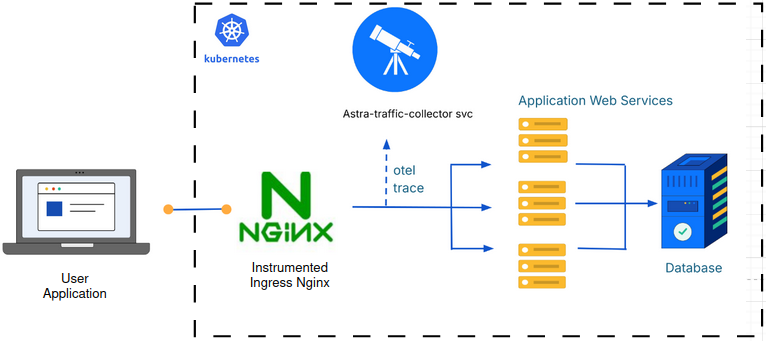
Illustration: High-level integration flow between Ingress Nginx and Astra Traffic Collector
Prerequisites
Astra Traffic Collector is installed and reachable in your Kubernetes cluster.
An Nginx sensor integration has been created and you have the Sensor ID ready.
Installation Steps
Step 1: Install ingress-nginx
If you already have ingress-nginx installed in your kubernetes infrastructure, please proceed to Step 3
To install ingress-nginx in your kubernetes infrastructure, please refer to these article:
Step 2: Verify installation
Run the following and confirm the controller pod shows a Running status.
kubectl get all -n ingress-nginxSample output in successful installation scenario
NAME                                                    READY    STATUS    RESTARTS   AGE

    pod/nginx-ingress-ingress-nginx-controller-xxx-xx       1/1      Running   0          1m

    NAME                                                       TYPE           CLUSTER-IP      EXTERNAL-IP     PORT(S)                      AGE

    service/nginx-ingress-ingress-nginx-controller             LoadBalancer   10.100.58.201               80:32404/TCP,443:31635/TCP   1m
    service/nginx-ingress-ingress-nginx-controller-admission   ClusterIP      10.100.66.225             443/TCP                      1m

    NAME                                                         READY   UP-TO-DATE   AVAILABLE  AGE
    deployment.apps/nginx-ingress-ingress-nginx-controller       1/1     1            1          1m

    NAME                                                         DESIRED   CURRENT   READY   AGE
    replicaset.apps/nginx-ingress-ingress-nginx-controller-xxx   1         1         1       1m
Step 3 : Create a working directory and back up existing Helm values
Create the working directory and take a backup of existing ingress-nginx Helm values before making any changes. Even though the customizations do not alter ingress-nginx functionality, a backup is strongly recommended.
mkdir -p ~/getastra/ingress_nginx_instrumentation && cd ~/getastra/ingress_nginx_instrumentationTake the backup of the existing ingress-nginx helm values if they are already customized.
sudo helm get values ingress-nginx -n ingress-nginx -o yaml | sudo tee ingress-nginx-original-values.yaml
Step 4: Modify nginx.tmpl for response header instrumentation
First, upgrade ingress-nginx to the latest version to ensure the nginx.tmpl is in sync.
sudo helm upgrade ingress-nginx ingress-nginx/ingress-nginx -n ingress-nginx
Fetch the nginx.tmpl from ingress-nginx pod by executing:
POD_NAME=$(sudo kubectl get pods -n ingress-nginx -l app.kubernetes.io/name=ingress-nginx -o jsonpath='{.items[0].metadata.name}')
sudo kubectl cp -n ingress-nginx $POD_NAME:/etc/nginx/template/nginx.tmpl ori_nginx.tmpl
Keep the original file as backup. Copy the file:
sudo cp ori_nginx.tmpl nginx.tmpl
Open the nginx.tmpl in text editor and then search for keyword header_filter_by_lua_block. Add the lines as shown below
set $resp_headers '';
header_filter_by_lua_block {
                local cjson = require "cjson"
                ngx.var.resp_headers = cjson.encode(ngx.resp.get_headers())
 }
Step 5 — Create ConfigMap
Create config map for nginx-template-astra-instrumented
sudo kubectl create configmap nginx-template-astra-instrumented --from-file=nginx.tmpl -n ingress-nginx
Create file called as ga-obs-config.yaml with following content
apiVersion: v1
kind: ConfigMap
metadata:
     name: ga-obs-config
     namespace: ingress-nginx
data:
     ga_obs_nginx.toml: |
            exporter = "otlp"
            processor = "batch"
            [exporters.otlp]
            host = "astra-traffic-collector.astra-collector.svc.cluster.local"
            port = 4317
            # Optional: enable SSL, for endpoints that support it
            # use_ssl = true
            # Optional: set a filesystem path to a pem file to be used for SSL encryption
            # (when use_ssl = true)
            # ssl_cert_path = "/path/to/cacert.pem"
            [processors.batch]
            max_queue_size = 2048
            schedule_delay_millis = 5000
            max_export_batch_size = 512
            [service]
            # Can also be set by the OTEL_SERVICE_NAME environment variable.
            name = "nginx-proxy" # Opentelemetry resource name
            [sampler]
            name = "AlwaysOn" # Also: AlwaysOff, TraceIdRatioBased
            ratio = 1.0
            parent_based = false
Create configmap for ga-obs-config.yaml
sudo kubectl apply -f ga-obs-config.yaml
Verify the configmap created
sudo kubectl get cm -n ingress-nginx
Step 6 : Create values.yaml
Create values.yaml with following content.
Replace mySensorID from the following YAML with the sensorID fetched from Astra Dashboard for this nginx integration
controller:

        extraVolumeMounts:
          - mountPath: /etc/nginx/template/nginx.tmpl
            subPath: nginx.tmpl
            name: nginx-template-volume
            readOnly: true
          - mountPath: /etc/nginx/ga-obs
            name: ga-obs
            readOnly: true

        extraVolumes:
          - name: nginx-template-volume
            configMap:
                name: nginx-template-astra-instrumented
                defaultMode: 420
          - name: ga-obs
            configMap:
                name: ga-obs-config
                defaultMode: 420

        config:
            allow-snippet-annotations: "true"
            http-snippet: |
                opentelemetry_config /etc/nginx/ga-obs/ga_obs_nginx.toml;
                opentelemetry_ignore_paths /is-dynamic-lb-initialized|/health|/metric;
            location-snippet: |
                opentelemetry_operation_name ga-otel-nginx;
                opentelemetry_attribute sensor.version $nginx_version;

                opentelemetry_attribute sensor.id mySensorID;

                opentelemetry_attribute http.request.body $request_body;
                opentelemetry_attribute net.sock.peer.addr $remote_addr;
                opentelemetry_attribute net.sock.peer.port $remote_port;
                access_by_lua_block {
                    local cjson = require "cjson"
                    ngx.var.req_headers = cjson.encode(ngx.req.get_headers())
                }
                opentelemetry_attribute http.request.headers $req_headers;
                opentelemetry_attribute http.response.headers $resp_headers;
            main-snippet: |
                load_module /etc/nginx/modules/otel_ngx_module.so;
            server-snippet: |
                set $req_headers '';
Step 7 : Update Helm values
Preview: Verify the changes (using diff). Following commands installs the diff and then performs a diff command to show what are being changed
sudo helm plugin install https://github.com/databus23/helm-diff
sudo helm diff upgrade ingress-nginx -n ingress-nginx ingress-nginx/ingress-nginx -f values.yaml --debug
Apply the changes
sudo helm upgrade ingress-nginx -n ingress-nginx ingress-nginx/ingress-nginx -f values.yaml --debug
Troubleshooting
No entries appearing in inventory and DNS resolution errors in nginx logs
If you see an error similar to "DNS resolution failed" in /var/log/etc/nginx.log, nginx cannot resolve the Astra Traffic Collector address.
Check the host value in the ga-obs-config ConfigMap and ensure it is set correctly:
[Error] File: /tmp/build/opentelemetry-cpp/exporters/otlp/src/otlp_grpc_exporter.cc:66 [OTLP TRACE GRPC Exporter] Export() failed with status_code: "UNAVAILABLE" error_message: "DNS resolution failed for ...
Cause
Nginx is unable to resolve traffic-collector address
Solution
Address of the traffic collector given in the configmap ga-obs-config is incorrect
Assign following values in ga-obs-config configmap
host = "astra-traffic-collector.{namespace}.svc.cluster.local"
port = 4317
How to get IP Address Of Traffic Collector in Non Kubernetes environment?
As container network is the same network as host network, the IP of the container would be the same as the Virtual Machine IP.