How to Create a Sensor Integration for API Observability
Last updated: August 4, 2026
Overview
This guide explains how to create Sensor Integrations for API Observability in Astra Dashboard.
Prerequisites
Access to the API Security Platform
Appropriate user permissions to create integrations
Instructions
Step 1: Navigate to Traffic Connectors
Log in to the Astra Dashboard.
From the main navigation menu, select: API Security → Traffic Connectors
Chose the right workspace under which Integration needs to be created
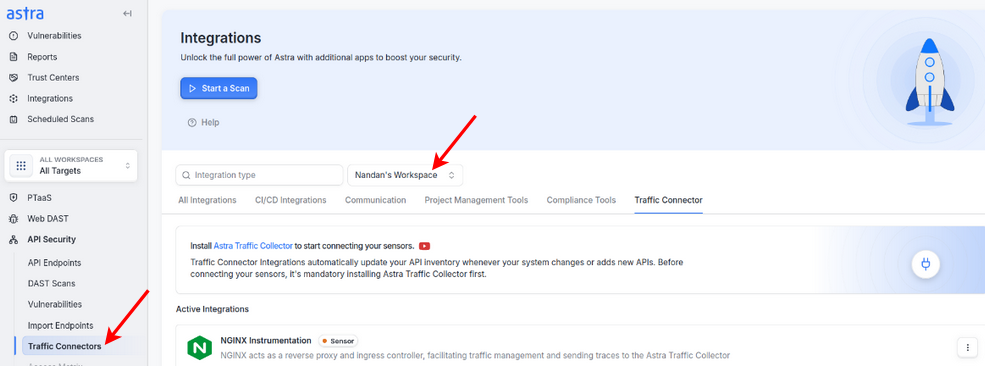
Step 2: Create Sensor Integration
The Sensor is deployed to capture API traffic data and forward it to the Astra Traffic Collector.
From the Traffic Connectors page, locate the desired Sensor type for your environment (e.g., NGINX, Envoy, Kong, API Gateway, etc.).
Click the Connect button next to the chosen sensor.
Complete the on-screen setup process. At the end, you will be provided with a Sensor ID.
Verify the sensor appears in the Active Integrations section.
You can copy the Sensor ID at any time after creation from the integration’s details page.

Best Practices
Store all integration credentials in a secure secrets manager.
Keep Sensor ID noted and handy for easy configuration.