Vulnerability ageing
Last updated: November 11, 2026
Vulnerability ageing shows how long a vulnerability has been open on its target, or how long it took to fix. It appears on every vulnerability's details and in the Full Report, so teams can spot findings that have stayed open too long and see how quickly fixes land.
Availability
The Ageing card is shown to everyone who can view the vulnerability. There is nothing to turn on.
Where to find ageing
The Ageing card sits in the details of each vulnerability.
Go to Vulnerabilities, or open a pentest or scan and go to its Vulnerabilities tab.
Click a vulnerability to open its details.
Find the Ageing card on the right, below basic details such as Status, Target and Found.
Hover over the information icon next to Ageing to see how it's counted: "Counted from the first scan that found this vulnerability. If it was fixed or risk-accepted and came back, the count restarts."
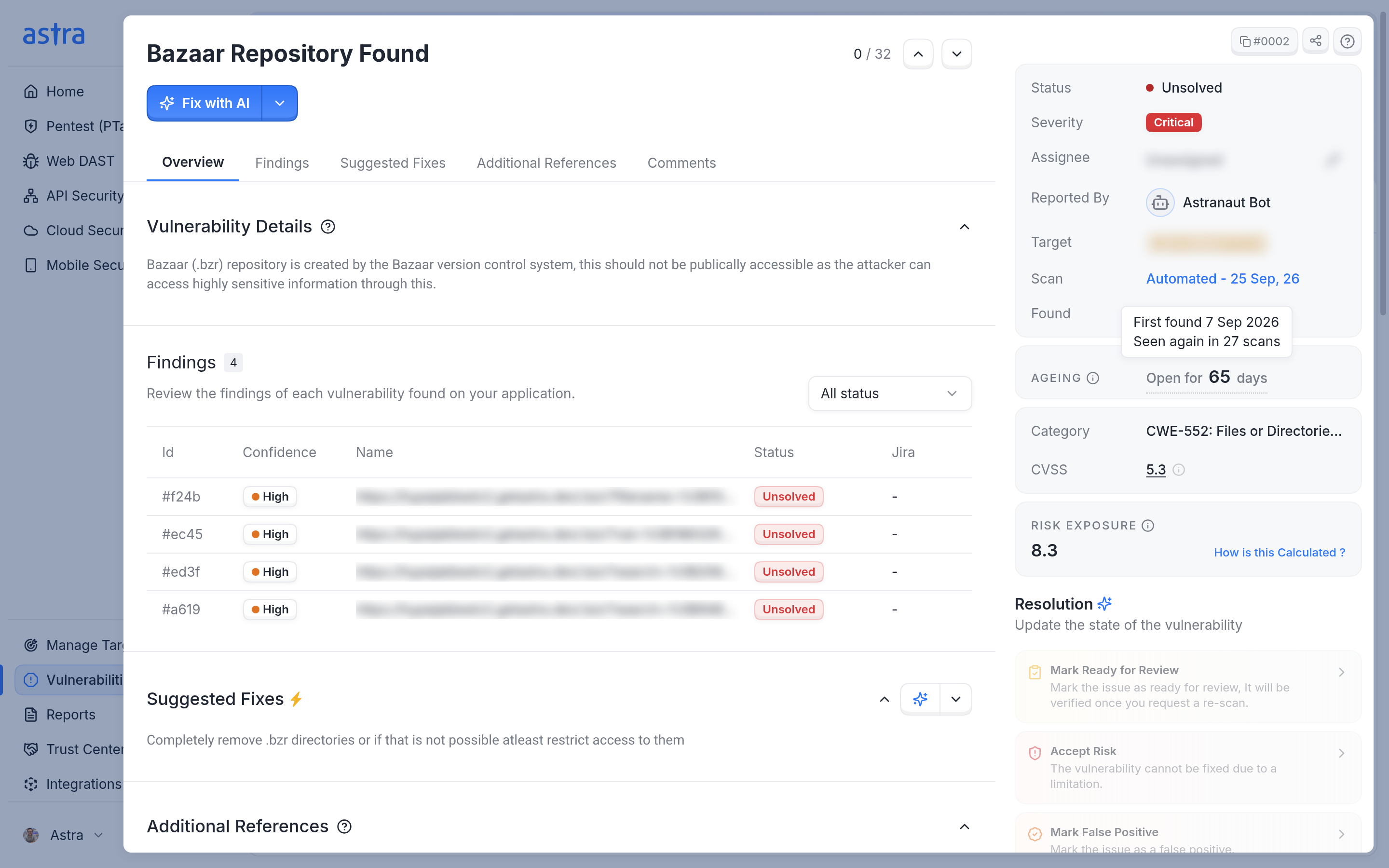
The Ageing card on an open vulnerability. Hovering over the number shows when it was first found and how many later scans found it again.
What the Ageing card shows
The card shows one main line, and sometimes a status line or a label.
Vulnerability status | Main line |
|---|---|
Open: Unsolved, Under Review or Need Help | Open for and the number of days, or Found today |
Open, and found again today after a fix or accepted risk | Reappeared today |
Solved | Fixed in and the number of days, or Fixed same day |
Counts never show zero days. A vulnerability that is one day old shows "1 day".
Dates behind the number. When the main line has a dotted underline, hover over it to see the dates behind it. Depending on the vulnerability, these lines can appear:
First found and a date: the first scan on this target that found the vulnerability.
Seen again in a number of scans: how many later scans found it while it stayed open.
Reappeared and a date: when a scan found it again after it was fixed or its risk was accepted.
Solved and a date: when it was moved to Solved.
Found and solved and a date: it was found and fixed on the same day.
A vulnerability that was found for the first time and is still open has no extra dates, because its date is already in Found.
Status line. An open vulnerability also shows what is happening to it now:
Under Review shows "Under review since" and the date it was moved to Under Review.
Need Help shows "Waiting on Astra since" and the date help was requested.
The line disappears when the status changes, for example when a rescan moves the vulnerability back to Unsolved.
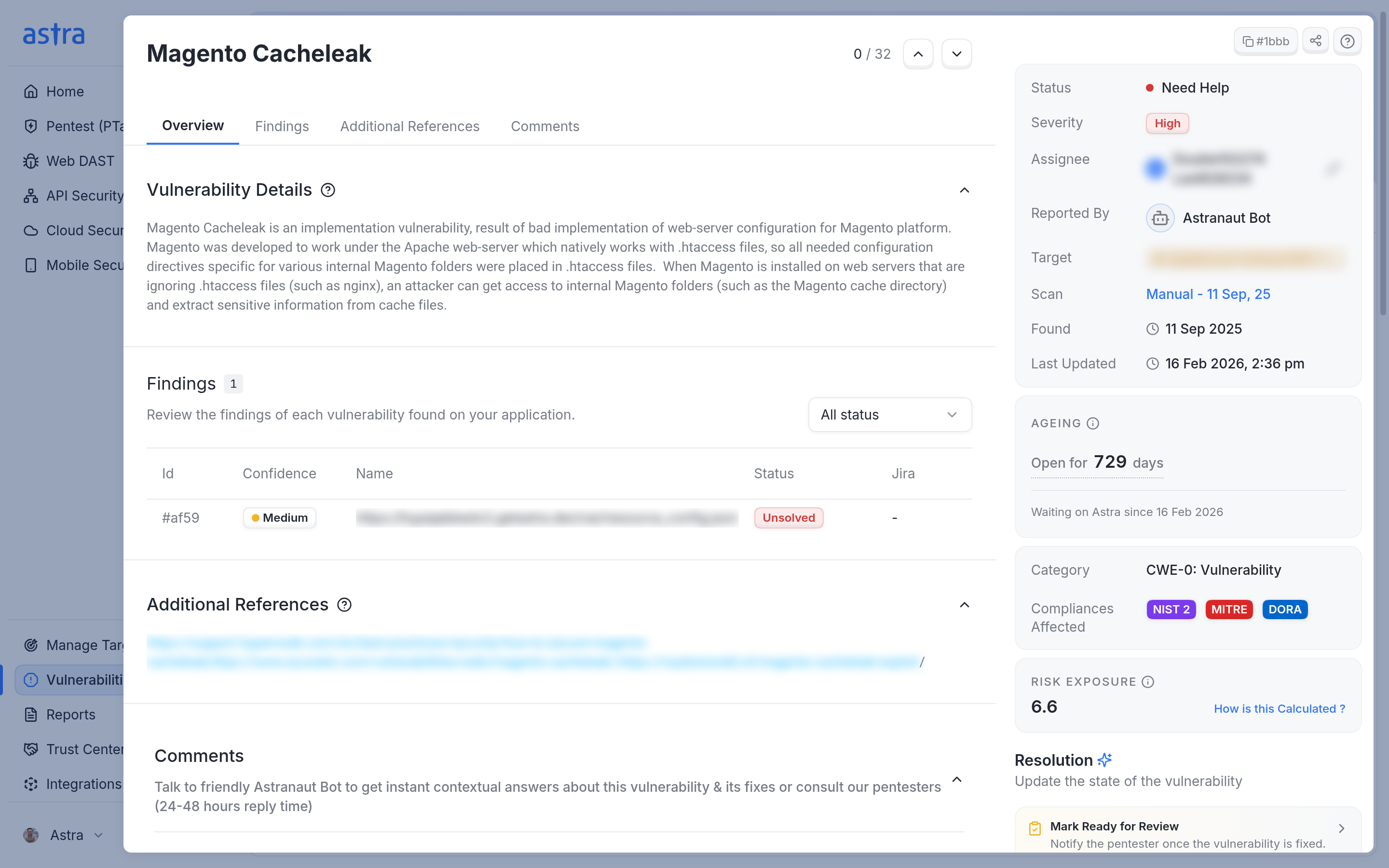
A vulnerability in Need Help shows how long it has been open and since when it has been waiting on Astra.
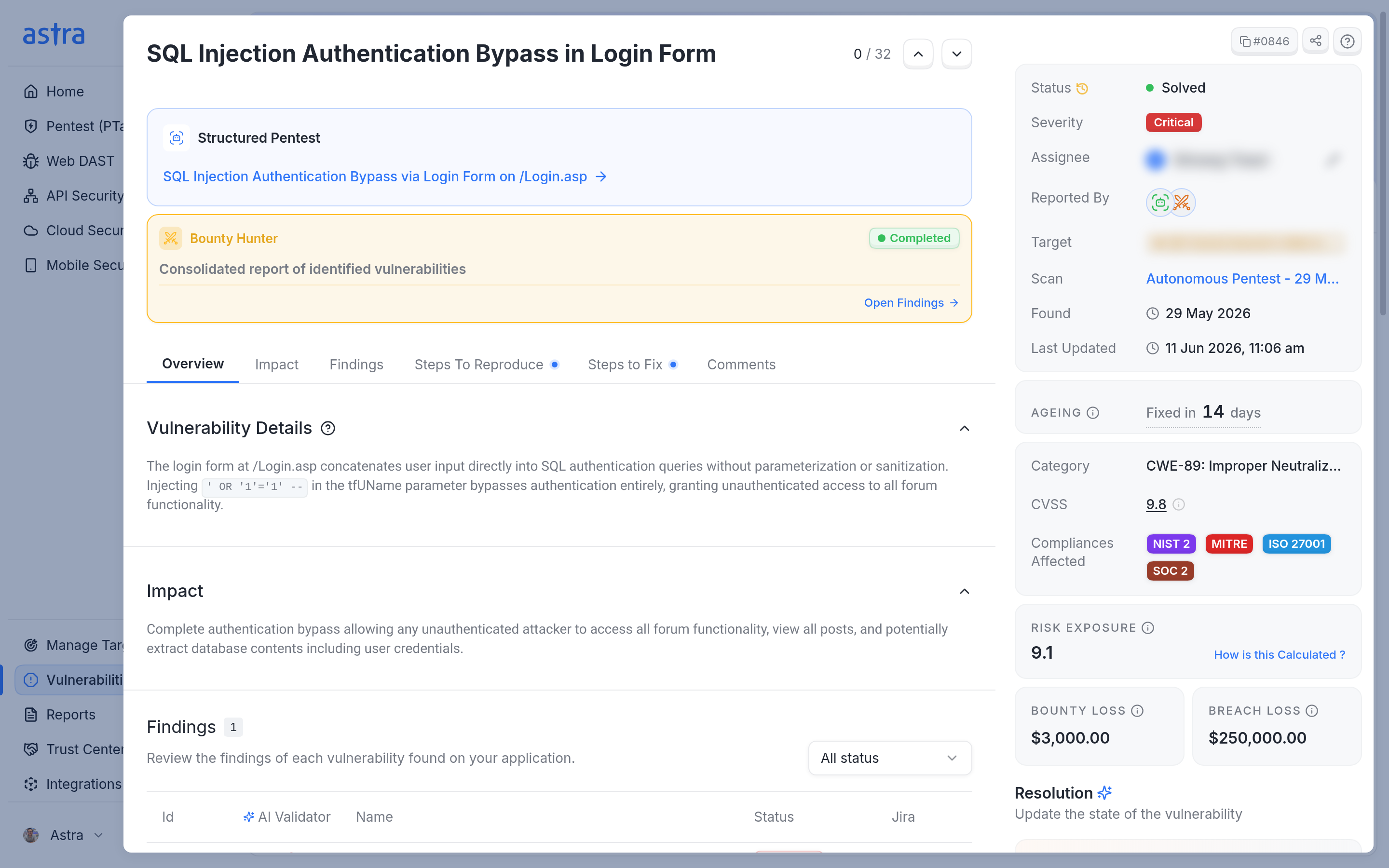
A solved vulnerability shows how long it took to fix.
Vulnerabilities that came back
When a later scan finds a vulnerability again after it was closed, the card adds a label and the count restarts from that scan.
Regressed: the vulnerability was fixed (Solved), and then a later scan found it again. Hover over the label to see when it was fixed and when it was found again, for example "Fixed on 20 Oct 2026, then found again by a scan on 21 Oct 2026." If it was fixed more than once, the note says how many times and gives the most recent fix date.
Raised again: the risk was accepted (Accepted Risk), and then a later scan found the vulnerability again. Hover over the label to see when the risk was accepted and when the vulnerability was found again.
Hovering over the main line shows the Reappeared date and the original First found date. The label stays on the vulnerability after it is fixed again.
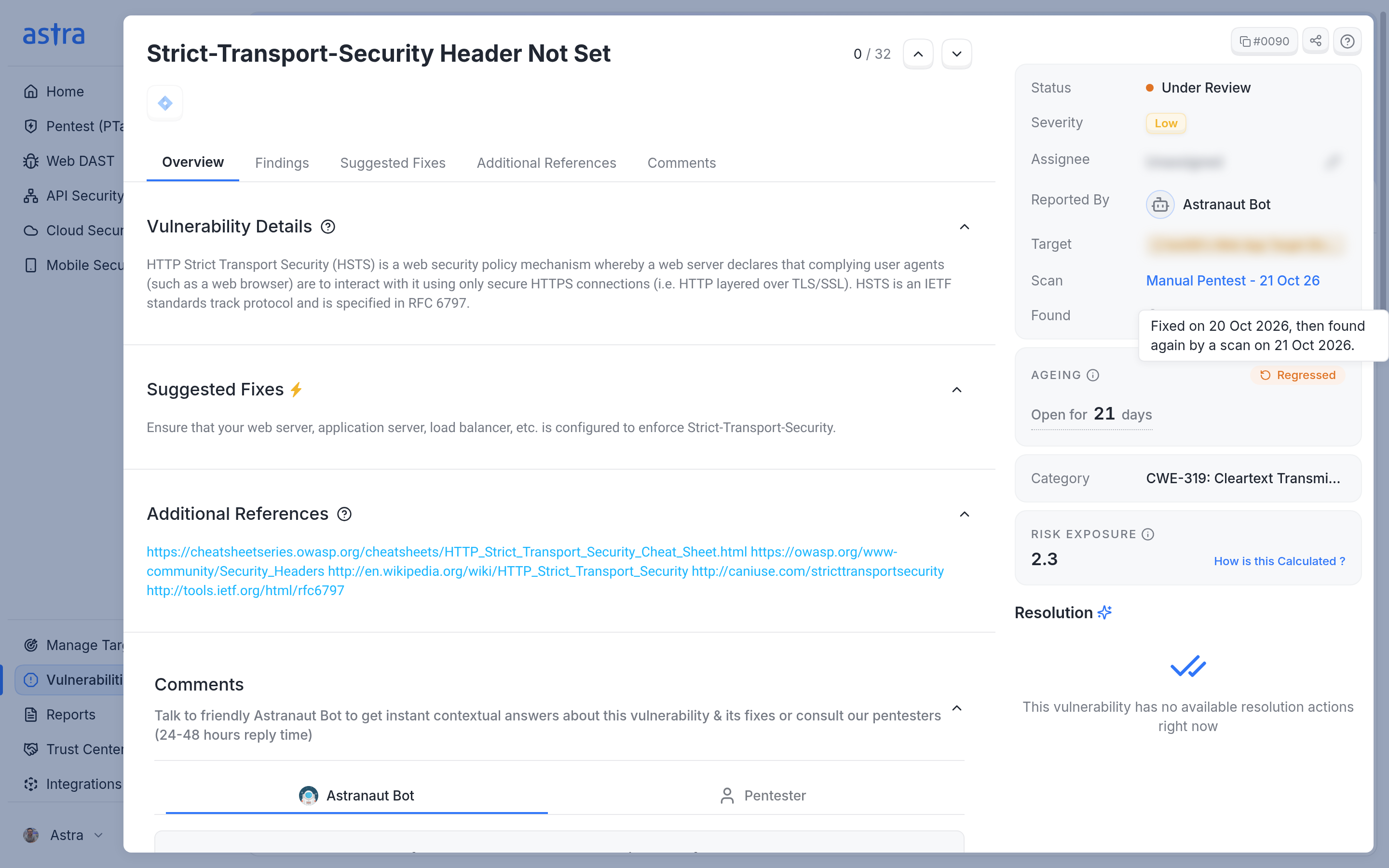
A Regressed label on a vulnerability that a scan found again the day after it was fixed.
How the count works
Ageing follows a vulnerability across scans and pentests on the same target.
Counted per target. Every copy of the same vulnerability on the same target shares one count, so it shows the same age in every pentest or scan that reported it.
Starts at the first scan that found it. The count starts from the first scan that found the vulnerability, not from the start of the latest pentest or scan.
Only Solved or Accepted Risk restarts it. Moving a vulnerability to Under Review or Need Help doesn't stop or restart the count. If a rescan moves it back to Unsolved, the count carries on.
A new period needs a later scan. The count restarts only when a scan finds the vulnerability again after a fix or accepted risk was recorded. A scan that found it before the fix was recorded doesn't count as it coming back.
Fix time is based on the status change. Fixed in counts from the start of the open period to the day the vulnerability was moved to Solved.
Found and Ageing answer different questions. Found is the date this copy of the vulnerability was reported, in this scan or pentest. Ageing can start on an earlier scan of the same target. In the first screenshot, Found shows 25 Sep 2026, but the vulnerability was first found on 7 Sep 2026, so it has been open for 65 days.
Note
Ageing counts calendar days in UTC, and its dates are shown in UTC. The Found date is shown in your local time, so the two can differ by a day.
When the Ageing card isn't shown
Some vulnerabilities have no Ageing card.
Draft and False Positive vulnerabilities have no ageing.
Accepted Risk vulnerabilities don't show the card, because their status and Found date already say everything it would. The Full Report still includes their ageing.
Solved vulnerabilities with no recorded fix date don't show the card. Astra doesn't estimate a missing date.
If the ageing details can't be loaded, the card is left out. The rest of the vulnerability details still load.
Ageing in the Full Report
The Full Report includes a Vulnerability Ageing row for each vulnerability in its Details of Vulnerabilities Found section. It uses the same rules and dates as the Ageing card. The row appears when Would you like to show the vulnerability details? is set to Show while creating the report.
The row puts the main line and the dates in one sentence, for example:
Open for 65 days (first found 7 Sep 2026, seen again in 27 scans)
Open for 21 days (reappeared 21 Oct 2026 after a fix on 20 Oct 2026, first found 31 Aug 2026)
Fixed in 14 days (first found 28 May 2026, solved 11 Jun 2026)
An Accepted Risk vulnerability shows "Risk accepted" with the date the risk was accepted and its first found date. A solved vulnerability with no recorded fix date shows "Solved (date not recorded)" and its first found date. Draft and false positive vulnerabilities have no ageing row. The row doesn't include the "Under review since" or "Waiting on Astra since" line, which only appears in the dashboard.
Ageing on the Home page
The Vulnerabilities Ageing chart on Home shows how long open vulnerabilities have stayed unresolved, grouped by age and coloured by severity. It uses the same start date as the Ageing card.
It counts open vulnerabilities (Unsolved, Under Review and Need Help) from pentests and scans that have reported results. Info-severity vulnerabilities and deactivated targets aren't included.
Each vulnerability is counted once per target.
Use 1m, 3m, 6m or the calendar to choose which vulnerabilities to include, by the date they were found. The chart shows 6m by default, and its age ranges adjust to the period you choose.
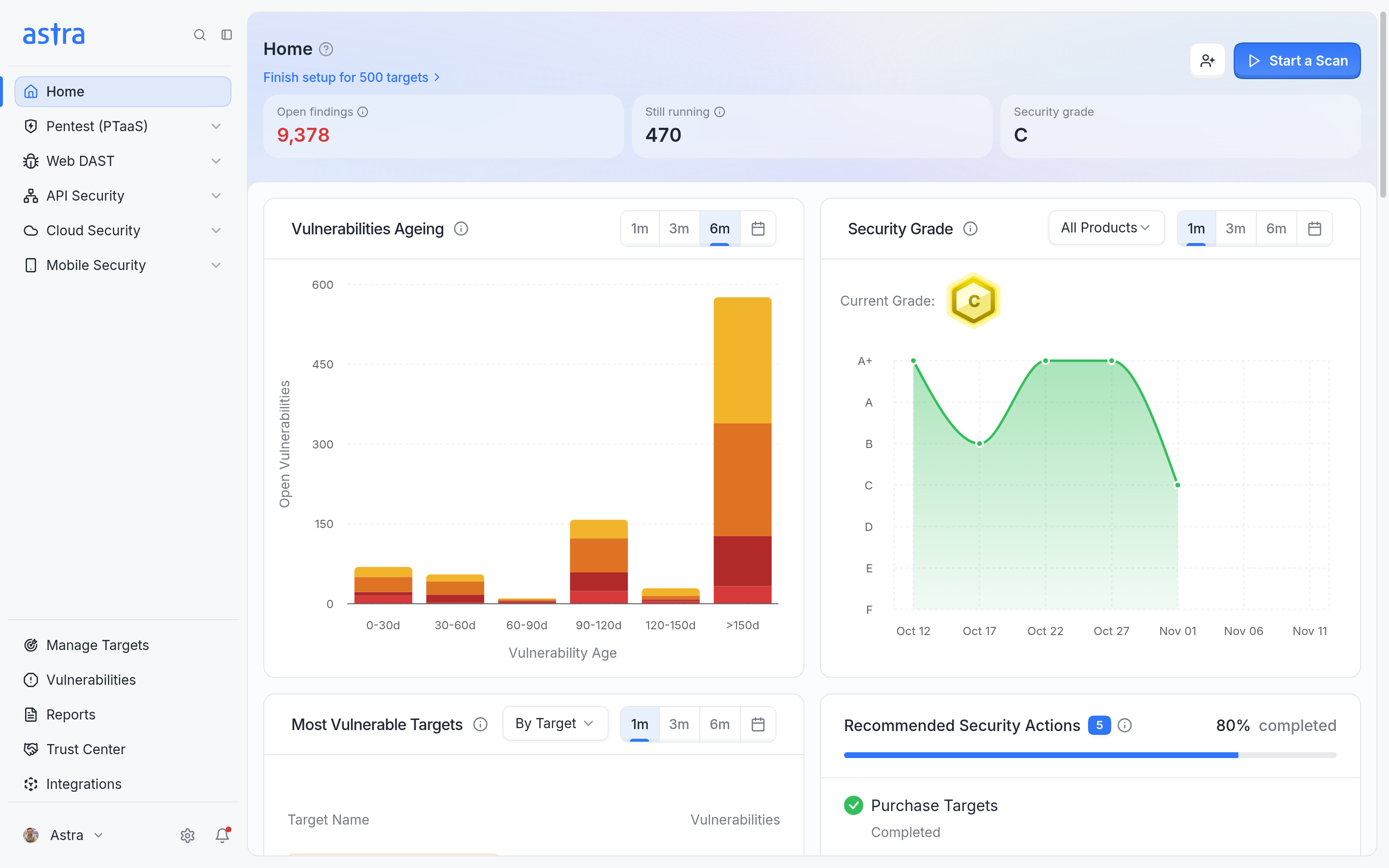
The Vulnerabilities Ageing chart on Home groups open vulnerabilities by how long they have been open.
Read more about the other Home widgets in Overview: Dashboard Page.
FAQ
Why does the same vulnerability show the same age in two pentests on the same target?
Ageing is counted per target, from the first scan that found the vulnerability. If two pentests on the same target report the same vulnerability, both show the same age. The count only restarts when the vulnerability was fixed or its risk was accepted, and then a later scan found it again.
If a vulnerability was moved to Under Review and a later scan finds it again, does ageing treat it as new?
No. Under Review doesn't close the vulnerability, so the count carries on from the first scan that found it. Only Solved or Accepted Risk followed by a later scan that finds it again restarts the count.
If a rescan moves a vulnerability from Under Review back to Unsolved, does the card start again at Found today?
No. The count keeps going from the original start date, so a vulnerability that has been open for two days shows "Open for 2 days". The "Under review since" line disappears, because the vulnerability is no longer in Under Review.
Why does the Full Report show only the first found date when the dashboard also shows "Waiting on Astra since"?
The report's Vulnerability Ageing row shows how long the vulnerability has been open and the dates behind that number. The "Under review since" and "Waiting on Astra since" lines describe the vulnerability's current status, so they only appear on the Ageing card in the dashboard.