How to setup Astra Packet Processor for Cloud Mirroring
Last updated: August 31, 2026
Introduction
Astra Packet Processor captures mirrored network traffic from GCP Packet Mirroring or AWS Traffic Mirroring and exports it as OpenTelemetry traces to the Astra Traffic Collector (ATC). It can be deployed using Ansible playbooks or manually via Docker Compose.
This guide covers both setup methods and the configuration files involved
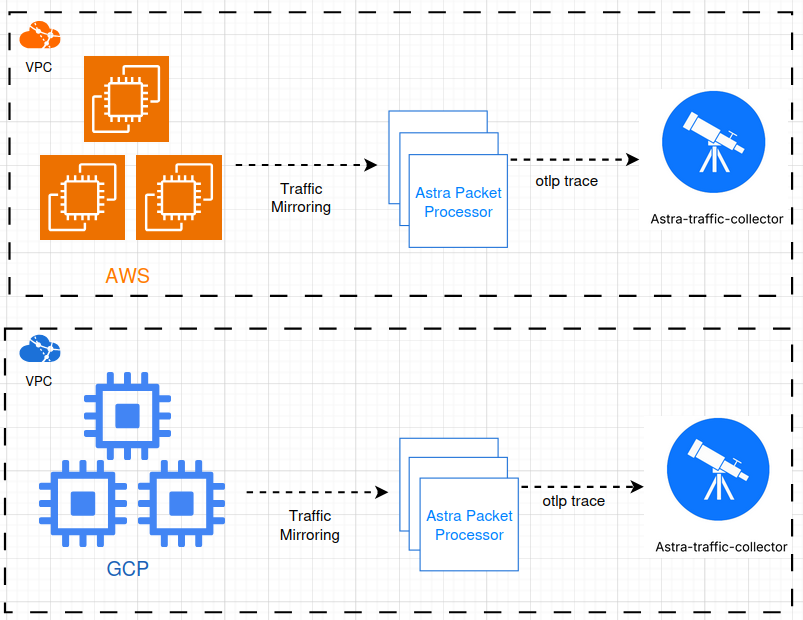
Illustration to indicate how Astra Packet Processor works with Astra Traffic Collector
Prerequisites
Before you begin, make sure you have the following ready:
Docker and Docker Compose
Docker and Docker Compose must be installed on the target machine. Refer to the official Docker docs for installation instructions.
Ansible (required for Ansible-based setup only)
Install Ansible on your control machine. Refer to the official Ansible docs for instructions.
SSH Access
Ensure you can SSH into the target machine as the intended remote user, and that the machine is added to your Ansible inventory (e.g.,
/etc/ansible/hosts).
Sensor Integration
An AWS Mirroring Sensor or GCP Mirroring Sensor integration must be created from the Astra dashboard. Keep the Sensor ID handy.
📄 How to Create Sensor Integration for API Observability
Astra Traffic Collector
The Astra Traffic Collector (ATC) must be running and reachable before setup.
Instructions
Choose your preferred setup method below.
Method 1: Install Using Ansible Playbooks
All required files are available in the Astra Mirroring Playbooks GitHub repository.
Step 1: Access the playbook and config files
Visit the repository and download the playbook files along with the Astra Packet Processor config files.
Step 2: Edit the configuration files
/.env - configures the OTEL exporter and retry settings. Edit the following:
ROUTINES- number of routines to runLOG_LEVEL- logging level (DEBUG,INFO,WARN, orERROR)OTEL_*- adjust OTEL exporter and retry settings as required
mirror-settings.json - defines mirroring behavior. Edit the following:
network-interface- network interfaces to monitorsensor-id- replace with the Integration ID shown during sensor creationotel-collector-endpoint- endpoint of the OTEL collectoraccept-hosts- list of accepted hostnamesdeny-content-type- list of content types to excludeip-host-mapping- maps IPv4/IPv6 addresses or ranges to hostnames
Sample mirror-settings.json:
{
      "sensor-id": "660e8400-e29b-41d4-a716-446655440000",
      "otel-collector-endpoint": "collector.example.com:4317",
      "accept-hosts": ["example.com", "api.example.com"],
      "deny-content-type": ["application/x-msdownload"],
      "ip-host-mapping": {
            "192.168.1.1": "server1.example.com",
            "192.168.0.0/16": "internal.example.com",
            "10.0.0.1-10.0.0.10": "dev-team.example.com",
            "172.16.*.*": "vpn.example.com"
            "2001:db8::1": "ipv6-server.example.com",
            "2001:db8::/64": "ipv6-network.example.com",
            "fe80::*": "link-local.example.com"
         }
}
setup.yaml and upgrade.yaml : populate the following keys in both files:
remote_user- Ansible user with permission to run Docker commandshosts- target machine(s) from your inventorymirror_settings_path- local path to yourmirror-settings.jsonenv_file_path- local path to your.envfile
Step 3. Add Target Hosts to Ansible Inventory
Add the target hosts in your Ansible inventory file, e.g., hosts
Visit the Ansible docs for instructions and strategies to build your inventory file
[instances]
<target-host-ip-1> ansible_user=<remote_user>
<target-host-ip-2> ansible_user=<remote_user>
<target-host-ip-3> ansible_user=<remote_user>
Step 4. Run the Setup Playbook Run the playbook to set up Astra Mirroring:
ansible-playbook -i /path/to/hosts setup.yaml
Step 5. Upgrade Astra Packet Processor
Run the playbook to upgrade the Astra Mirroring container:
ansible-playbook -i /path/to/hosts upgrade.yaml
Step 6. Remove dangling images of getastra/mirroring
Be cautious while using this playbook as it removes docker images of getastra/mirroring using the docker cli and not the Ansible's docker module
ansible-playbook -i /path/to/hosts remove.yaml
Method 2: Install Manually Using Docker Compose
Step 1. Access the docker-compose.yaml
Click here to get the docker-compose.yaml
Step 2. Run and Stop the docker-compose.yaml
#to start the astra packet processor
docker-compose up -d

#to stop astra packet processor
docker-compose down
Expected Outcome
Once the setup is complete, the Astra Packet Processor will:
Capture mirrored traffic from your GCP or AWS environment
Export it as OpenTelemetry traces to the Astra Traffic Collector
Begin populating API observability data in your Astra dashboard based on the sensor and host configuration you defined
Best Practices
Match the remote user across files. The
remote_userin your playbooks must match the user configured in your Ansible inventory file, or the playbook will fail.Verify Docker access for the remote user. The playbooks assume
dockeranddocker-composecommands are available to theremote_userwithoutsudo. Confirm this before running setup.Use correct file paths. The paths to
mirror-settings.jsonand.envmust be set accurately insetup.yamlandupgrade.yaml— incorrect paths are a common cause of failed deployments.Keep the Sensor ID accessible. Retrieve the Integration ID from the Astra dashboard at the time of sensor creation; it's required in
mirror-settings.jsonand not easily retrievable later.Test ATC connectivity before setup. Confirm the Astra Traffic Collector endpoint is reachable from the target machine before deploying the Packet Processor to avoid silent export failures.