How to Setup Astra Traffic Observability for Nginx, ft: Nginx Already Present
Last updated: June 11, 2026
Introduction
This guide explains how to configure Nginx with the OpenTelemetry (OTel) module to capture and monitor HTTP traffic in cloud-based virtual machine environments such as AWS, GCP, Azure, and DigitalOcean.
It covers the installation and configuration of Nginx instrumentation, validation steps to confirm telemetry data is reaching Astra Traffic Collector, and troubleshooting guidance for common deployment and operational issues
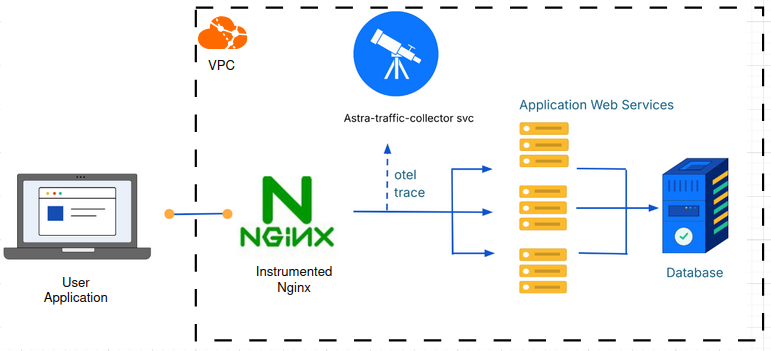
Illustration: High-level integration flow between Ingress Nginx and Astra Traffic Collector
Prerequisites
Before beginning, ensure you have:
Astra Traffic Collector is available and reachable.
Nginx sensor integration is created and
sensorIDis handy
Installation
Step 1: Backup Existing Configuration
Backup the Nginx config. Usually it's present at /etc/nginx/nginx.conf
It's essential to inject custom configuration into nginx.conf config to have Nginx successfully instrument the incoming request and response. Although these customization doesn't alter the functionality of Nginx, we strongly recommend to take the backup of existing Nginx configuration
mkdir ~/astra-obs && cd ~/astra-obs
cp /etc/nginx/nginx.conf .
Step 2: Register Nginx repository in your Virtual Machine
Depending upon the OS of Virtual Machine, you need to run specific package manager commands to register the repository
Click on this link to register the Nginx repository
After registering Nginx repository, run following to install required modules
sudo apt update
sudo apt install -y nginx-module-otel
sudo apt install -y nginx-module-njs
Step 3: Create /etc/nginx/ga_nginx_script.js file with following content
This will he a helper javascript file to access request and response headers
function req_headers_json(r) {
     return JSON.stringify(r.headersIn);
}

function resp_headers_json(r) {
     return JSON.stringify(r.headersOut);
}

export default { req_headers_json, resp_headers_json };
Step 4: Edit the /etc/nginx/nginx.conf file with following content to instrument the incoming requests
While editing the
/etc/nginx/nginx.conf, be sure to replace the following placeholder values with actual values.
variable | description | example value |
| IntegrationID displayed during the creation of Nginx Integration |
|
| Public IP address of the machine where Astra Traffic Collector is listening on port |
|
load_module modules/ngx_http_js_module.so;
load_module modules/ngx_otel_module.so;

user  nginx;
#...
#...events{}

http {
    include       /etc/nginx/mime.types;
    default_type  application/octet-stream;
    #...
    js_import ga_nginx_script.js;
    js_set $req_headers ga_nginx_script.req_headers_json;
    js_set $resp_headers ga_nginx_script.resp_headers_json;
    otel_exporter {
        endpoint localhost:4317; # OTEL collector's gRPC endpoint

        interval    5s;
        batch_size  512;
        batch_count 4;
    }
    #...
    server {
        #...

        location / {
            #...
            otel_trace on;
            otel_trace_context propagate;
            otel_span_attr sensor.version $nginx_version;

            otel_span_attr sensor.id mySensorID;

            otel_span_attr http.host $host;
            otel_span_attr http.request.body $request_body;
            otel_span_attr http.request.headers $req_headers;
            otel_span_attr http.response.headers $resp_headers;

            #...
            #proxy_pass http://backend;
            #...
        }
    }
}
Step 5: Restart Nginx
systemctl restart nginxTroubleshooting
Unable to send trace from nginx to traffic collector
Symptoms
No entries in inventory OR inventory not getting updated
Following or similar error seen in nginx log
[Error] File: /tmp/build/opentelemetry-cpp/exporters/otlp/src/otlp_grpc_exporter.cc:66 [OTLP TRACE GRPC Exporter] Export() failed with status_code: "UNAVAILABLE" error_message: "DNS resolution failed for ...
Cause
Nginx is unable to resolve traffic-collector address
Solution
If Address of the traffic collector given in
/etc/nginx/nginx.confis incorrect, locate thehttpblock innginx.conffile, find theotel_exporter {...}block, updateIPAddressOfTrafficCollectoras shown belowotel_exporter { endpoint IPAddressOfTrafficCollector:4317 ... }IPAddressOfTrafficCollector should be the your publicIP of the Astra Traffic Collector server instance
Restart nginx by running
nginx -s reload
Can I see what trace are sent from my environment?
📄 Verifying Traces in Astra Traffic Collector
How to get IP Address Of Traffic Collector in Non Kubernetes environment?
As container network is the same network as host network, the IP of the container would be the same as the Virtual Machine IP.