How to setup APIGEE Instrumentation
Last updated: August 31, 2026
Introduction
This guide walks you through adding a JavaScript policy to your Apigee proxy to capture API request and response data and forward it to the Astra Traffic Collector for security monitoring.
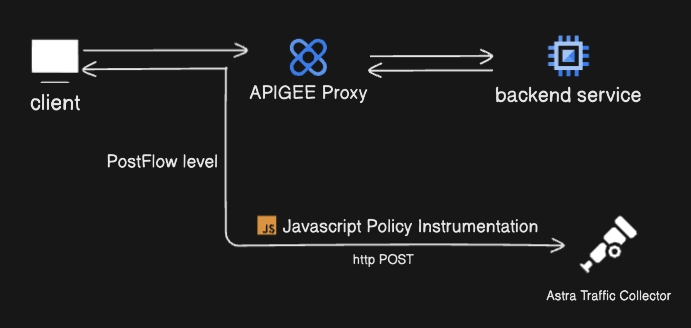
Illustration: High-level integration flow between APIGEE and Astra Traffic Collector
Prerequisites
Before you begin, please ensure you have the following ready:
Apigee Access: You must have access to the Apigee UI within Google Cloud.
Active Proxy: An existing Apigee proxy where you will attach the security policy.
Astra Traffic Collector: Your collector must be installed and reachable from your Apigee environment.
Sensor ID: You have created an APIGEE integration in your Astra Dashboard and copied the Sensor ID.
Instructions
Step 1: Set Up OTLP/HTTP Receiver in Astra Traffic Collector
You can configure Astra Traffic Collector to receive OTLP data over HTTP or HTTPS.
📄 How To Set Up OTLP/HTTP Receiver in Astra Traffic Collector
Step 2: Create a JavaScript Policy in APIGEE
Go to your Apigee API Proxy.
Select the Develop tab.
Click + Add Step in the ProxyEndpoint PostFlow section at Response time.
Choose to create a new Policy with type as JavaScript under the Extension Policies.
Provide a name and then upload the javascript policy available here.
Before attaching the policy, modify the configuration variables at the top of the JavaScript file
Variable | Description | Example Value |
| Controls sampling frequency (0–1). |
|
| Your proxy domain name. |
|
| Sensor ID from Astra dashboard. |
|
| OTLP/HTTP endpoint of the Astra Traffic Collector. |
|
var samplingRatio = 1;                   // exampleValue: 0.5
var domainName = "your-domain.com";      // exampleValue: "mydomain.nip.io"
var sensorId = "your-sensor-id";         // exampleValue: "12345678-1234-4abc-9def-987654321000"
var astraTrafficCollectorEndpoint = "";  // exampleValue: "https?://collector-ip-or-domain-endpoint:4318/v1/traces"


//----------------------DO NOT CHANGE THIS. Below is javascript policy. DO NOT CHANGE THIS ----------------------

// Generate a random number between 0 and 1
var randomValue = Math.random();

// Execute only if the random value is = samplingRatio
if (samplingRatio == 1 || randomValue = samplingRatio) {
    // Capture request headers
    var allReqHeaders = {};
    for (var header in request.headers) {
        allReqHeaders[header] = request.headers[header];
    }
    allReqHeaders["host"] = domainName;
    context.setVariable('allReqHeaders', JSON.stringify(allReqHeaders));

    // Capture response headers
    var allRespHeaders = {};
    for (var header in response.headers) {
        allRespHeaders[header] = response.headers[header];
    }
    context.setVariable('allRespHeaders', JSON.stringify(allRespHeaders));

    // Extract path from proxy URL
    var proxyUrl = context.getVariable('proxy.url');

    function getPathFromUrl(proxyUrl) {
        var firstDoubleSlash = proxyUrl.indexOf("//");
        if (firstDoubleSlash !== -1) {
            var startIndex = proxyUrl.indexOf("/", firstDoubleSlash + 2);
            return startIndex !== -1 ? proxyUrl.substring(startIndex) : "/";
        }
        return "/";
    }

    var targetPath = getPathFromUrl(proxyUrl);

    // Construct OpenTelemetry payload
    var payload = {
        "resourceSpans": [
            {
                "resource": {
                    "attributes": [
                        { "key": "service.name", "value": { "stringValue": "astra-apigee-js-instrumentation" } },
                        { "key": "sensor.id", "value": { "stringValue": sensorId } },
                        { "key": "sensor.version", "value": { "stringValue": "1.0.0" } },
                    ]
                },
                "scopeSpans": [
                    {
                        "scope": { "name": "instrumentaton" },
                        "spans": [
                            {
                                "traceId": "1234567890abcdef1234567890abcdef",
                                "spanId": "abcdef1234567890",
                                "name": "proxy-endpoint-span",
                                "kind": 1,
                                "startTimeUnixNano": Date.now() * 1e6,
                                "endTimeUnixNano": Date.now() * 1e6,
                                "attributes": [
                                    { "key": "http.method", "value": { "stringValue": context.getVariable('request.verb') } },
                                    { "key": "http.status_code", "value": { "intValue": parseInt(context.getVariable('response.status.code'), 10) } },
                                    { "key": "http.target", "value": { "stringValue": targetPath } },
                                    { "key": "http.host", "value": { "stringValue": domainName } },
                                    { "key": "http.flavor", "value": { "stringValue": context.getVariable('request.version') } },
                                    { "key": "http.scheme", "value": { "stringValue": context.getVariable('client.scheme') } },
                                    { "key": "net.sock.peer.addr", "value": { "stringValue": context.getVariable('client.ip') } },
                                    { "key": "http.request.headers", "value": { "stringValue": context.getVariable('allReqHeaders') } },
                                    { "key": "http.response.headers", "value": { "stringValue": context.getVariable('allRespHeaders') } },
                                    { "key": "http.request.body", "value": { "stringValue": context.getVariable('request.content') } },
                                    { "key": "http.response.body", "value": { "stringValue": context.getVariable('response.content') } }
                                ]
                            }
                        ]
                    }
                ]
            }
        ]
    };

    // Store payload as an Apigee variable
    context.setVariable('OTELPayload', JSON.stringify(payload));

    // Function to handle HTTP response
    function onComplete(response, error) {
        if (response) {
            if (response.status >= 200 && response.status  300) {
                print('Payload sent successfully. Response Status: ' + response.status);
            } else {
                print('Failed to send payload. Status: ' + response.status);
                print('Response Content: ' + response.content);
            }
        } else {
            print('HTTP Request Error: ' + error);
            context.setVariable('jscallout-http-error', 'Error: ' + error);
        }
    }

    // Send payload to OpenTelemetry collector
    var method = 'POST';
    var headers = { 'content-type': 'application/json' };
    var body = context.getVariable('OTELPayload');
    var req = new Request(astraTrafficCollectorEndpoint, method, headers, body);
    httpClient.send(req, onComplete);
}
Click on the policy that just got created and you will be able to see a similar XML that apigee created to attach the JS File to the policy
<?xml version="1.0" encoding="UTF-8" standalone="yes"?>
<Javascript continueOnError="false" enabled="true" timeLimit="500" name="logReqRespPolicy">
  <DisplayName>logReqRespPolicy</DisplayName>
  <Properties/>
  <ResourceURL>jsc://instrument.js</ResourceURL>
</Javascript>
By default, the timeLimit attribute in policy's xml file is set to 200ms. If your Astra Traffic Collector used https secure communication, increase the timeLimit (500ms) to avoid failure of response from your backend service.
Step 3: How the Policy Works
Request & Response Headers — Captures all request and response headers.
Request & Response Body — Captures the full payload content.
Trace Attributes — Generates an OpenTelemetry-compatible payload.
Conditional Sampling — Sends only a subset of requests if
samplingRatiois less than 1.Outbound Transmission — Sends the payload to Astra Traffic Collector over HTTP(S).
Expected Outcome
Once the policy is attached and saved, Apigee will begin capturing headers and body content for both requests and responses. This data is then formatted as an OpenTelemetry-compatible payload and sent to your Astra Traffic Collector. You can verify this by checking your Astra Dashboard's API Inventory or inspecting the logs of your traffic collector
Troubleshooting
Traces not appearing: Double-check that the
sensorIdandastraTrafficCollectorEndpointare correctly updated in the JavaScript file.Syntax Errors: Ensure the JavaScript file is correctly referenced in the policy and that no syntax errors were introduced during variable updates.
Variable Debugging: Use the
context.setVariable()function within Apigee to debug and verify variable values during runtime.Use
context.setVariable()to debug variable values.
If you encounter any issues, please raise a support ticket through your Astra dashboard or contact us at help@getastra.com.