Inventory Import – Populate API Inventory Using Hoppscotch Collections
Last updated: November 20, 2026
You can upload a Hoppscotch collection to Astra and import its endpoints into your API inventory. Astra reads the files exported from Hoppscotch directly, so you don't need to convert them first. This article shows how to export the files, upload them and import the endpoints.
If some endpoints or application URLs are missing from your scan results, read Why certain URLs may not appear in the scan sitemap before you import.
Before you start
A Hoppscotch collection that is complete and runs successfully.
The Hoppscotch environment file, if the collection uses variables such as a base URL or a token.
An Astra API target with an API base URL saved.
Import a Hoppscotch collection
Export the files from Hoppscotch
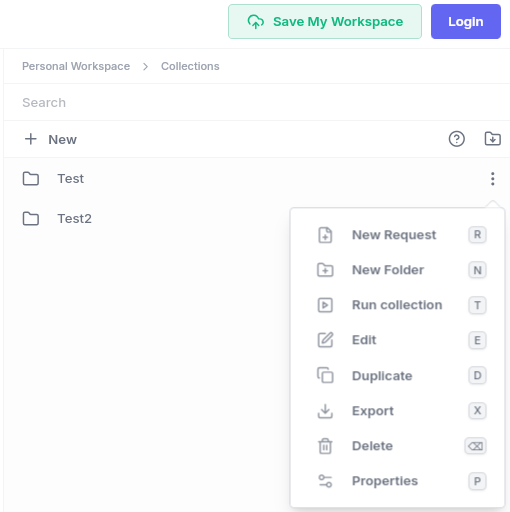
In Hoppscotch, click the more icon next to the collection or the environment.
Click Export.
Choose where to save the file and click Save.
Do this once for the collection and once for the environment.
Upload the files to Astra
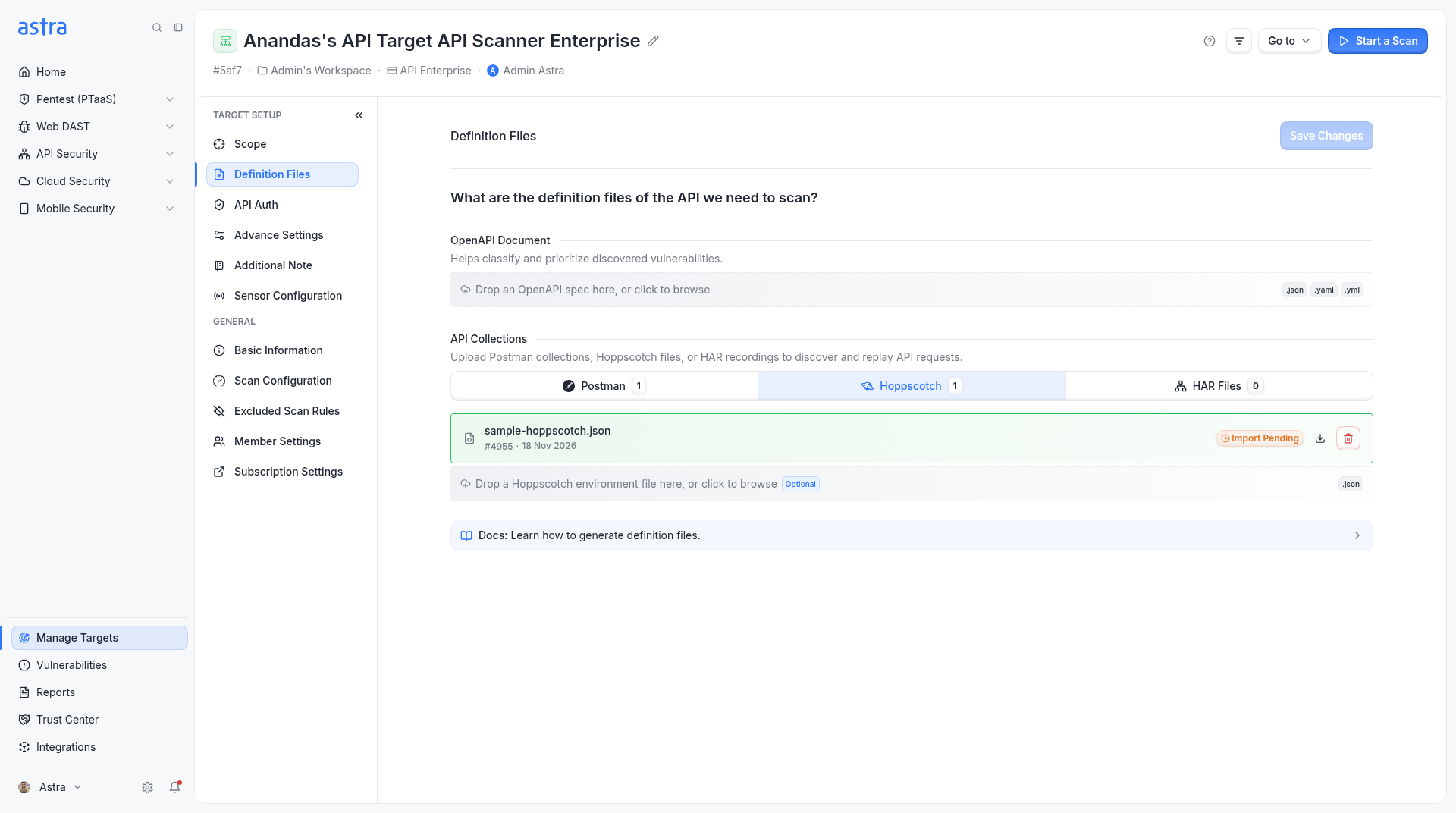
Open the Targets page. For a target that is still being set up, click Setup on its row and open API definitions. For an active target, click the settings icon on its row and open Definition Files.
Open the Hoppscotch tab. It shows how many files it holds.
Drop the collection file on the upload area, or click the area to browse. Upload the collection first.
Optional: add the environment file the same way.
After the upload, the file appears with the status Import Pending. The environment upload below it is marked Optional.
Import the endpoints
On Definition Files, find the line that says the files are ready to import.
Click Import endpoints, and then click Import endpoints again in Import these endpoints?.
Follow the import with View import, or open Import Endpoints in the left menu.
Astra replays the requests in your collection. Requests that return a 2xx or 3xx response are added to your inventory, and failed requests are listed with the reason. Read more in 📄 How to import your API endpoints.
Best practices
Run the collection in Hoppscotch first. Fix broken URLs, missing variables and authentication problems before you export.
Export the environment with the collection. Without it, variables stay unresolved and requests fail.
Keep valid credentials in the collection. Astra replays the requests with the credentials inside the files.
Name files with a date or version. For example
api-collection-2026-11-18.json.Export again when your API changes. An import reflects your API at the time you exported it.
Troubleshooting
The file isn't JSON, or the environment was uploaded first
What you see: The Hoppscotch tab won't accept your file.
What to do: Export the collection again as JSON, and upload it before the environment file.
The current collection hasn't been used in an import yet
What you see: You can't upload a new collection.
What to do: Start the import for the current collection first, and then upload the new one.
Requests returned errors, often because a token expired
What you see: The import shows failed requests.
What to do: Open the import, open a failed request to read the Status Code and Error Message, fix the collection or environment, and import again.