How to Create Collector Integration for API Observability
Last updated: August 27, 2026
Introduction
Before Astra Traffic Collector can receive and process API traffic, a collector integration must be created in the API Security Platform. This integration generates the credentials required for authentication between Astra Traffic Collector and the platform.
This guide walks you through creating a new Astra Traffic Collector integration, retrieving the generated credentials, and regenerating them when required. The generated Collector ID, Client ID, and Client Secret will be used during Traffic Collector installation and configuration.
Prerequisites
Access to the API Security Platform
Appropriate user permissions to create integrations
Installation
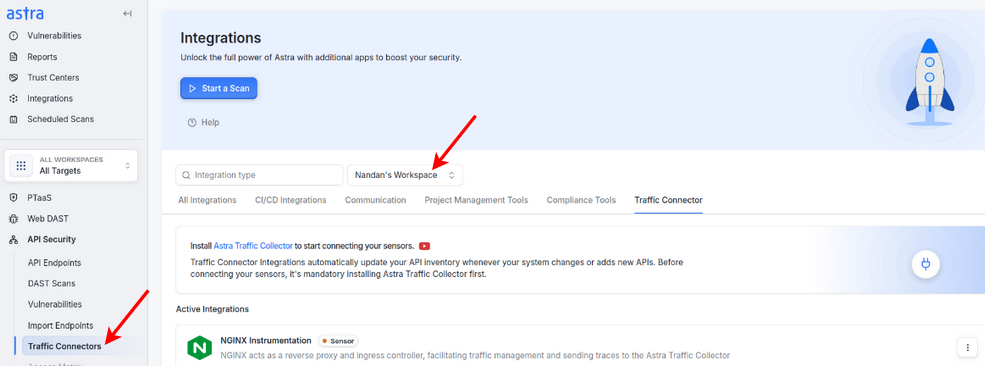
Step 1: Navigate to Traffic Connectors
Log in to the Astra Dashboard.
From the main navigation menu, select:
API Security → Traffic ConnectorsChose the right workspace under which Integration needs to be created
Step 2: Create Collector Integration
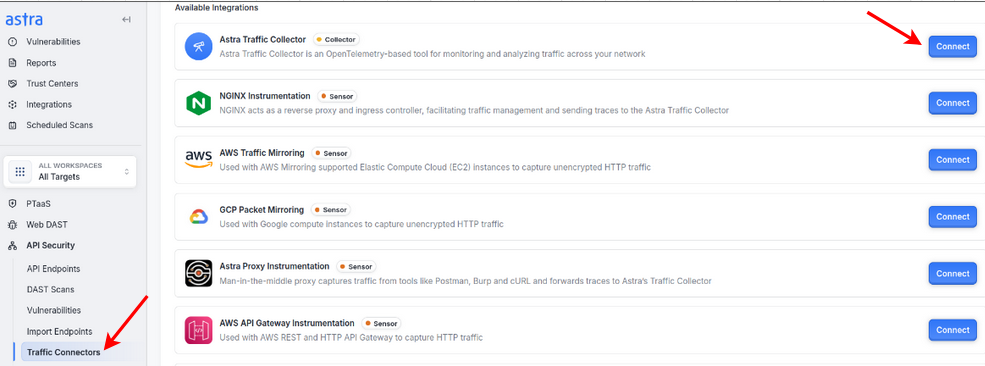
The Astra Traffic Collector is responsible for receiving and processing telemetry data from your APIs.
Locate the Astra Traffic Collector row in the integrations list.
Click the Connect button next to it.
Follow the on-screen prompts to complete the setup wizard.
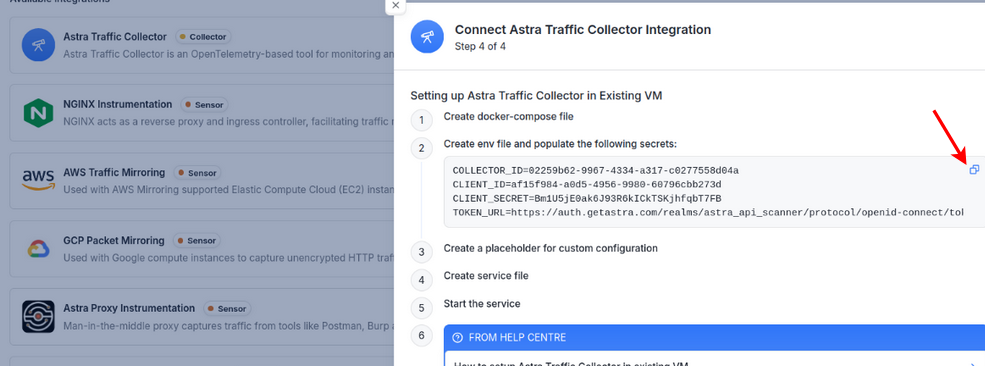
At the final step, you will be shown the following credentials:
Client ID
Client Secret
Important Notes:
These credentials are similar to Personal Access Tokens (PAT) and will only be displayed once.
Store them securely; if lost, you will need to regenerate them.
Regenerating credentials will invalidate the old ones, and the Traffic Collector configuration must be updated with the new credentials.
After successful creation, the collector should now appear under the Active Integrations section.
Regenerating Credentials for Astra Traffic Collector
If you lose your Client Secret or need to rotate credentials for security compliance, you can regenerate them.
Navigate to Active Integrations in the Traffic Connectors section.
Locate the specific Astra Traffic Collector integration instance.
Click the three-dot menu (⋮) next to it and select Regenerate Client Secret.

The portal will display:
Collector ID
Client ID
Client Secret
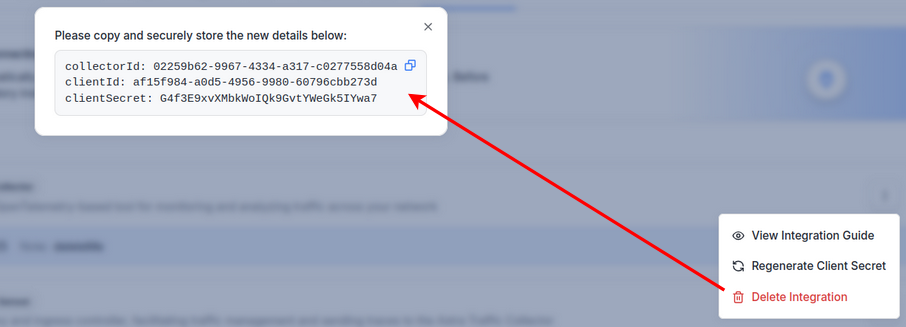
Update your Traffic Collector configuration to use these new credentials immediately.
Note: The old credentials will no longer work once regeneration is complete.
Best Practices
Store all integration credentials in a secure secrets manager.
Rotate credentials periodically for security compliance.
Verify integrations by sending test API traffic and checking the collector logs.