Overview: Web Application Crawling in Astra
Last updated: August 6, 2026
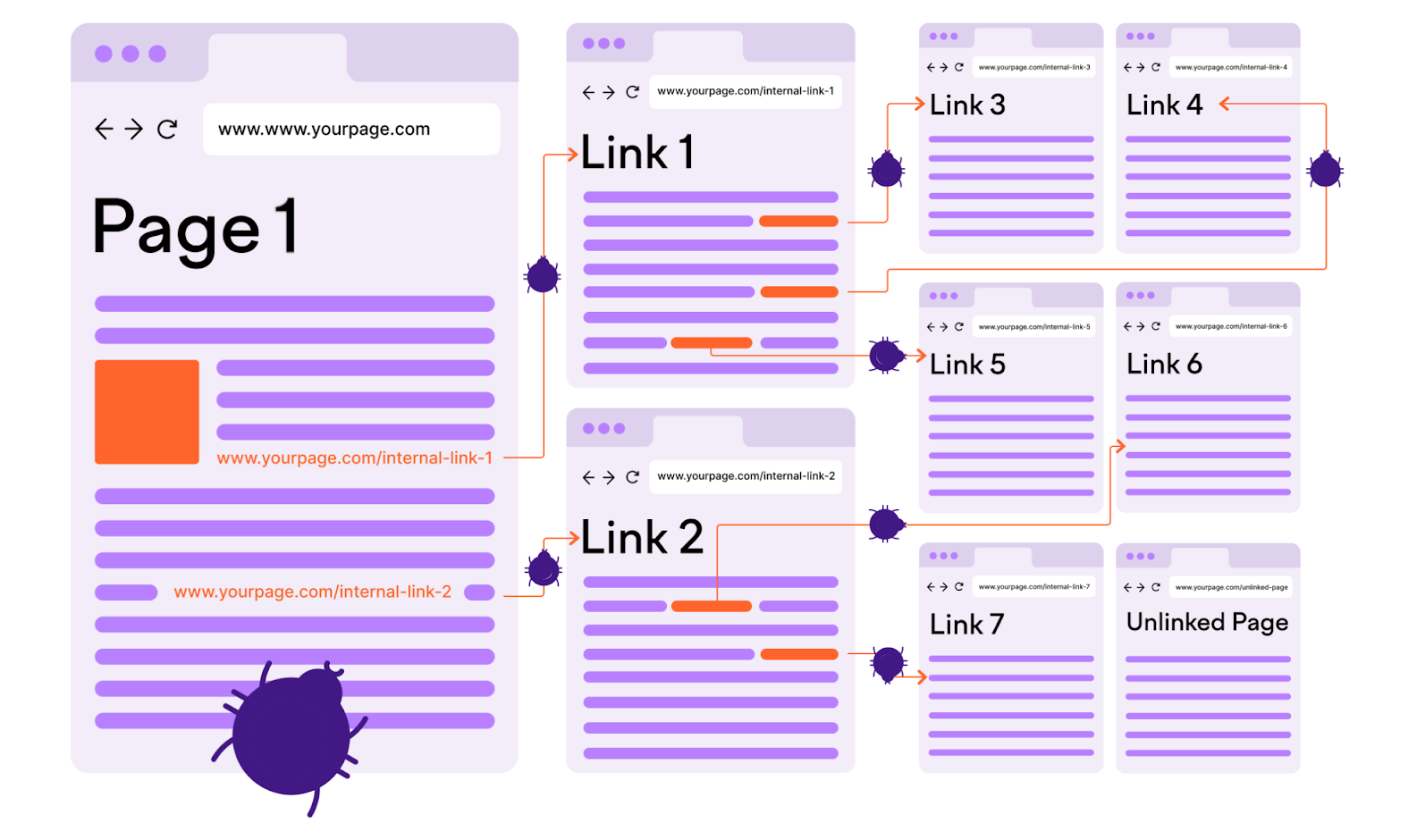
Our dynamic application security testing (DAST) engine uses real browsers such as Chromium and Firefox to crawl and explore web applications. This is fundamentally different from traditional crawlers that rely solely on parsing HTML responses and following raw links.
By using real browser automation, our crawler can fully render and interact with web pages as a real user would, allowing it to effectively handle both modern single-page applications (SPAs) and traditional multi-page applications.
Why We Use Real Browsers for Crawling
Modern web applications often rely heavily on JavaScript for rendering content and handling user interactions. Features such as client-side routing, dynamic DOM updates, asynchronous content loading, and JavaScript-driven navigation mean that large parts of the application may not be visible to a traditional crawler.
Using real browsers enables our crawler to:
Execute all JavaScript on the page, ensuring dynamic content is rendered correctly
Interact with the live DOM, discovering elements that are injected at runtime
Simulate real user behavior, including clicking buttons, scrolling, submitting forms, opening modals, etc.
Handle client-side routing, as found in SPAs built with frameworks like React, Vue, and Angular
Follow dynamic navigation flows, which may not involve full-page reloads or traditional links
Retain full session context, including cookies, localStorage, and sessionStorage
This results in significantly better coverage of the application’s attack surface, especially for parts of the UI that only appear after user interaction or JavaScript execution.
Crawling SPAs and JavaScript-Heavy Applications
Single-page applications pose specific challenges:
URLs may not change in a predictable way, or navigation may occur entirely within the browser via client-side routing
Many components are loaded on-demand, based on user interaction or asynchronous API responses
State and user context can influence what’s shown on the screen at any given time
To effectively crawl such applications, our engine observes and reacts to DOM changes during browser execution. It doesn’t rely solely on static links or URLs. Instead, it:
Watches for DOM mutations and dynamically added elements
Listens for network activity, such as API requests triggered by interactions
Tracks navigation events even when the URL doesn't change via full reloads
Simulates interactions such as clicks, scrolls, and form submissions to uncover new views and endpoints
This allows the engine to discover API calls, application states, and pages that would otherwise be missed.
Authentication-Aware Crawling
For authenticated scans, the real browser session is preserved across requests. This allows the scanner to:
Stay logged in across the crawl session
Access user-specific or restricted parts of the application
Navigate through login workflows that require JavaScript (e.g., multi-step logins, third-party SSO)
You can configure your application’s authentication method in the scan settings to ensure proper session handling during the crawl.
Better API Coverage Through Browser-Based Crawling
A significant advantage of using real browsers for crawling is the automatic triggering of API calls as part of the application's normal operation. When the crawler interacts with the frontend (clicking, navigating, scrolling, or filling out forms) it causes the application to fire XHR/fetch/WebSocket requests just as a real user would.
This allows our engine to:
Capture more API endpoints, including those that are only invoked after specific user actions or during dynamic component loading
Observe the full request and response lifecycle, including headers, parameters, payloads, and returned data
Handle client-side logic that constructs or modifies API calls dynamically
Discover variations of API usage, such as optional parameters or different payload formats, based on user interactions
Since many modern applications rely on asynchronous APIs for nearly all data exchange, this results in significantly better visibility into the backend surface area. Traditional scanners that parse static HTML or rely on pre-defined lists of endpoints often miss such dynamic or user-triggered API traffic.
By capturing these requests in a real browsing context, the DAST engine ensures that APIs are not just detected but also evaluated for security issues as part of the scan.
Crawling Traditional Multi-Page Applications
While SPAs benefit the most from real browser crawling, traditional multi-page applications (MPAs) are also crawled more effectively:
Our engine executes scripts that modify or load content after the initial HTML is delivered
It handles JavaScript-based redirects and form submissions that might not be picked up by simpler crawlers
It can follow non-standard link mechanisms, such as elements that use
onclickhandlers or other JavaScript events instead of<a href="">tags
Using a real browser also helps handle edge cases like:
Custom UI frameworks and component libraries
Content behind sliders, accordions, or dropdowns
CSRF tokens and hidden fields that are dynamically generated
JavaScript-based login mechanisms
Benefits
By using real browsers in the crawling phase, our DAST engine achieves:
Greater coverage of application features, regardless of how they are loaded or displayed
Improved detection of endpoints and parameters, including hidden or dynamically generated ones
Effective exploration of modern frontend architectures, such as SPAs and component-based UIs
Accurate simulation of real user behavior, ensuring the scanner tests what actual users (and attackers) would see
How Our Crawling Engine Works: Step-by-Step Flow
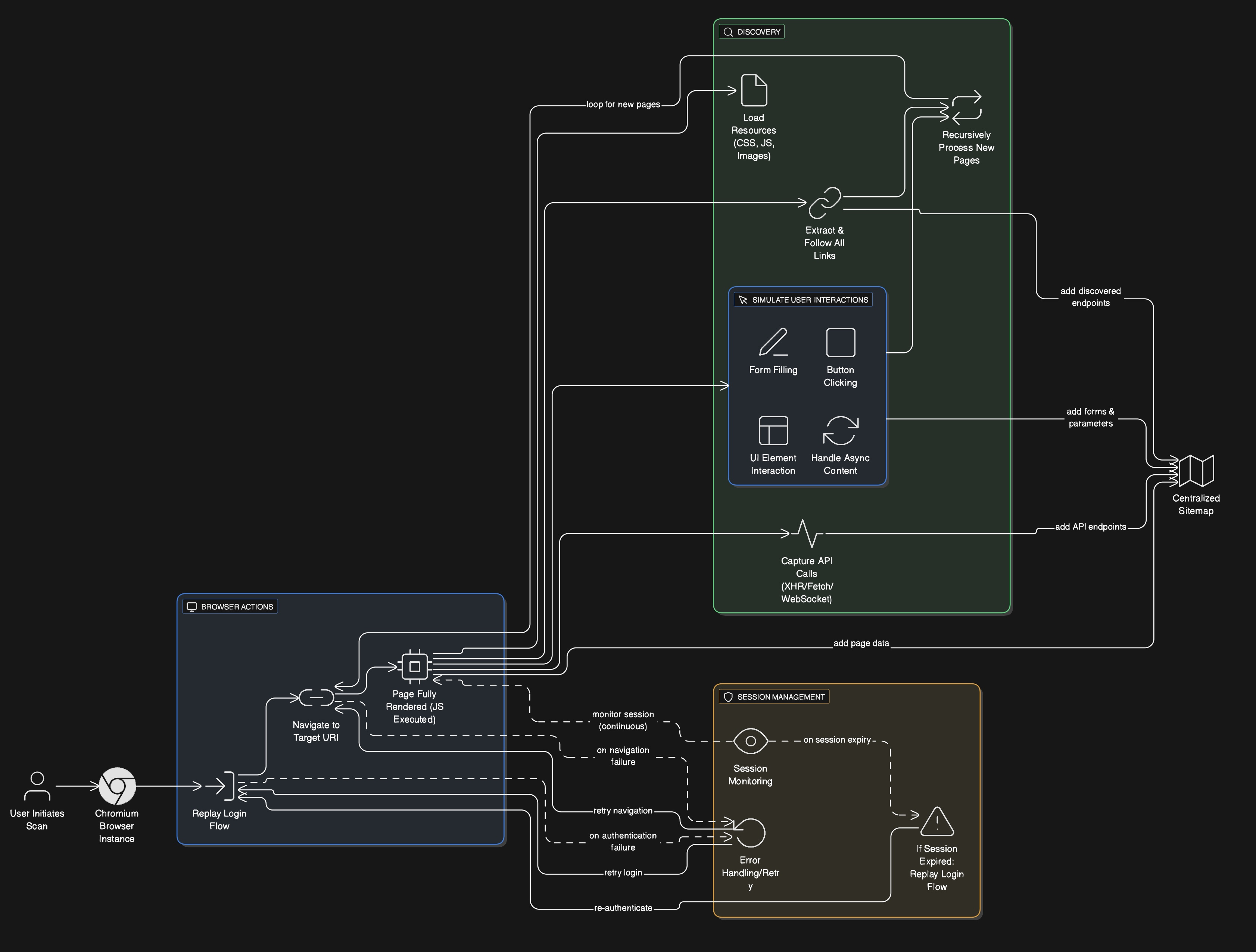
To ensure maximum coverage of modern web applications including SPAs and dynamic interfaces, Astra’s crawler follows a structured and automated flow using real browsers (Chromium or Firefox). Below is an overview of how this crawling process works internally:
1. Scan Initiation
The crawl begins when a user initiates a scan through the Astra platform. At this point, all configured parameters such as target URL, authentication method, and crawl scope are loaded.
2. Real Browser Launch
A headless Chromium browser is launched to simulate an actual user environment. This enables full JavaScript execution and dynamic content rendering.
3. Authentication
If login is required, the previously recorded login flow is replayed inside the browser. This ensures that the crawler starts its scan from an authenticated session, with cookies, tokens, and session storage in place.
4. Initial Navigation
The crawler navigates to the primary target URI and waits for the page to fully render, including DOM content, asynchronous data, and front-end logic.
5. Page Exploration
Once the page is loaded:
All links are extracted and queued for crawling.
All resources (e.g., scripts, stylesheets, images) are recorded.
Any API calls (XHR, fetch, WebSocket) triggered during page load or user simulation are captured and logged.
6. User Interaction Simulation
To uncover deeper parts of the application:
Forms are automatically filled and submitted.
Buttons, tabs, and navigation elements are clicked.
Scroll actions and mouse events are triggered where applicable.
This mimics a real user’s interaction pattern, ensuring that dynamic sections and hidden content are exposed.
7. Recursive Crawling
New pages discovered through navigation or interaction are processed in the same way. For each new page:
Content is rendered
Links and endpoints are extracted
API traffic is captured
Interactions are simulated
This recursive approach continues until the defined scope is exhausted or no new content is found.
8. Sitemap Construction
All discovered pages, resources, API endpoints, and parameter variations are added to an evolving sitemap. This acts as a comprehensive inventory of the application’s reachable surface area.
9. Session Monitoring and Re-Authentication
The crawler continuously monitors session validity. If the session expires (due to timeouts or authentication controls), the login recording is replayed in-browser to restore access and resume crawling seamlessly.