Best Practices for Using Your Rescan Quota
Last updated: November 24, 2026
Each pentest includes a set number of manual rescans, where Astra's security engineers check whether you've fixed the vulnerabilities they reported. Many pentests also offer automated rescans, where Astra's scanner re-checks the vulnerabilities it found. Automated rescans don't use your manual rescans, so using them first helps you save manual rescans for the findings that need an engineer.
This article explains how your rescan quota and rescan window work, which rescan type to use for which findings, and a workflow for verifying fixes efficiently. For the full request steps, read 📄 How to request a rescan.
Your manual rescan quota
The number of manual rescans per pentest depends on your plan. To see how many you have left, click Rescan > Manual Rescan on the Pentest Details page and check the Rescan Eligibility panel. When no manual rescans are left, the Rescan Eligibility panel shows that none remain. If the pentest doesn't also offer automated rescans, the Rescan button shows None left. If it does, the Rescan menu stays available so you can still request an automated rescan.
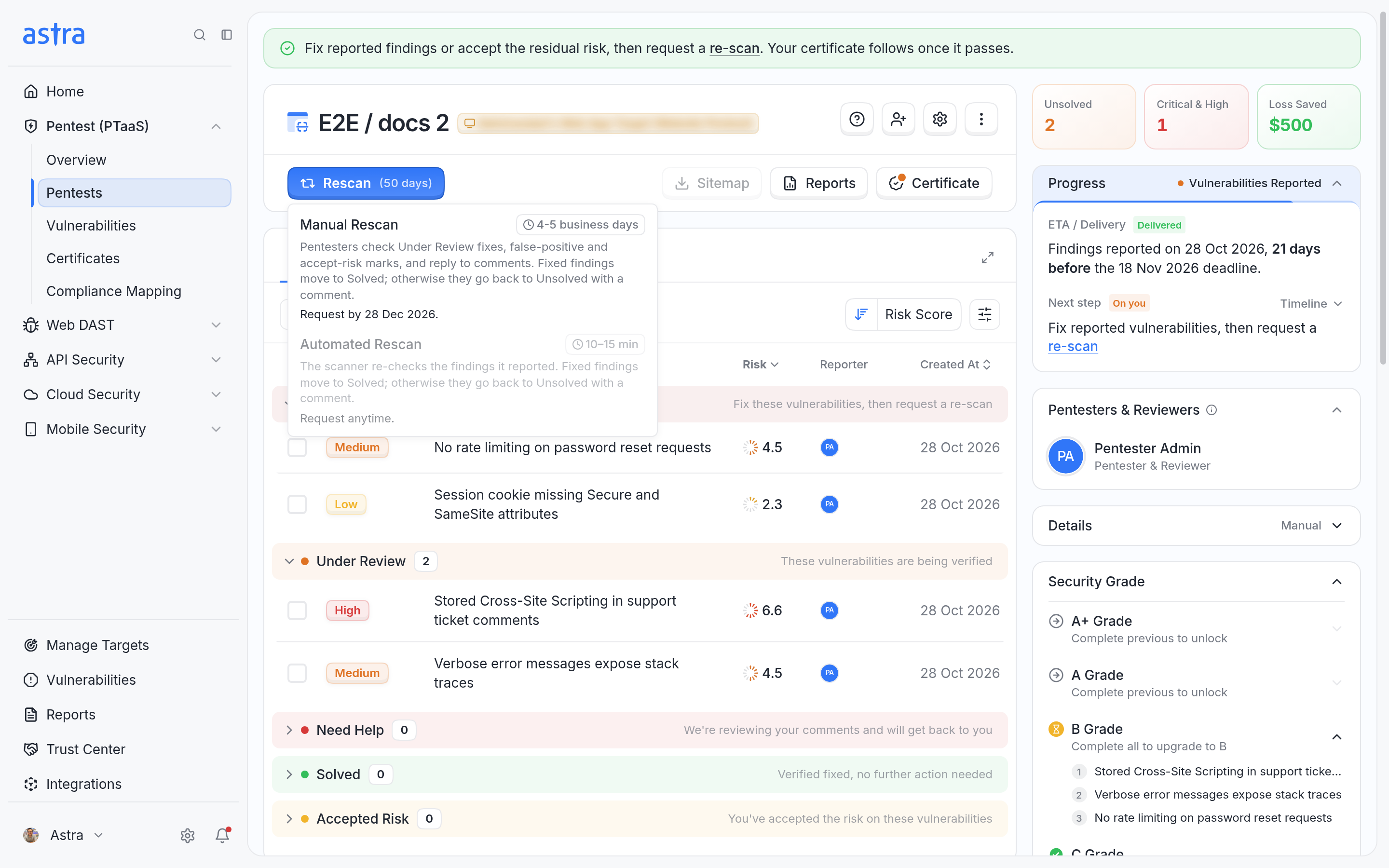
The Rescan menu on a pentest, with Manual Rescan and Automated Rescan.
If you need more manual rescans, contact your Customer Success Manager (CSM). Additional rescans may be available for your engagement.
Your rescan window
A manual rescan can be requested only until a set date. How long the window lasts depends on your plan, and it starts when the vulnerabilities are reported.
The Rescan button shows how many days are left, for example Rescan (61 days). Hover over it to see the last date.
The Rescan Eligibility panel shows the same date as Rescans valid until.
After that date, the button shows Expired if automated rescans aren't offered. If they are, the Rescan menu stays available for automated rescans.
If you need more time to fix the findings, contact your CSM before the window ends. Read more in 📄 How to Get an Extension for Your Re-Scan Deadline.
Which rescan to use
Detail | Manual Rescan | Automated Rescan |
Who verifies the fixes | Astra's security engineers | Astra's scanner |
Which vulnerabilities it covers | Any reported vulnerability, whoever reported it | Only vulnerabilities found by Astra's automated scanners |
Uses a manual rescan | Yes | No |
When you can request it | Until the rescan window ends | At any time |
Vulnerabilities reported by a pentester need a manual rescan. If you include one in an automated rescan, Astra shows "This vulnerability was reported by a pentester and isn't eligible for automated rescans".
Automated Rescan isn't offered for every pentest. It isn't available for Hybrid or Autonomous pentests, Android and iOS targets, Digital Ocean cloud targets, or other unsupported cloud providers. Use Manual Rescan for these.
Recommended workflow
Fix the reported vulnerabilities. Make the code or configuration changes, then click Mark Ready for Review on each fixed vulnerability so it moves to Under Review.
Run an automated rescan first, where it's offered. Click Rescan > Automated Rescan to check your fixes for scanner-reported vulnerabilities. Vulnerabilities that aren't fixed go back to Unsolved.
Refine and repeat. Adjust any fixes that didn't pass and run the automated rescan again. This doesn't use your manual rescans.
Request a manual rescan for the rest. When you're confident in your fixes, click Rescan > Manual Rescan for the findings that need verification by Astra's security engineers, including those reported by pentesters.
Best practices
Use Automated Rescan where it's offered before you request a manual rescan.
Group fixes together and request one manual rescan for several vulnerabilities, rather than one rescan per fix.
The Rescan Eligibility panel shows a "Good to have: Include 50%+ of critical and high" recommendation before you request a manual rescan. It doesn't block the request.
Request your manual rescan before the rescan window ends.
If you expect to need more time, contact your CSM before the window ends.
FAQ
Does an automated rescan use my manual rescans?
No. Automated rescans don't count toward your manual rescans.
How many manual rescans do I have, and until when?
It depends on your plan. The Rescan Eligibility panel shows the rescans available and Rescans valid until, and the Rescan button shows the days left.
Which vulnerabilities can an automated rescan verify?
Only vulnerabilities found by Astra's automated scanners. Vulnerabilities reported by a pentester need a manual rescan.
Can the manual rescan window be extended?
Contact your CSM before the window ends. Read more in 📄 How to Get an Extension for Your Re-Scan Deadline.
What if I need more manual rescans?
Contact your CSM to discuss the options for your engagement.
If you have questions about rescans, contact support from your Astra dashboard or reach out to your CSM.