How-To: Scanning Internal Applications via Envoy Forward Proxy
Last updated: August 5, 2026
When internal applications, APIs, or IPs are not publicly accessible, exposing each service to the internet is often not feasible. One solution is to deploy an Envoy forward proxy within the private network. This proxy allows Astra to route scanning traffic through it to reach internal applications without exposing them publicly.
Overview
The setup uses a forward proxy VM inside the private network. Astra, which has a fixed set of scanning IPs, sends HTTP and port scan requests to the client infrastructure through the Envoy proxy. The proxy enforces access controls and logging, while allowing centralized management of inbound scanning traffic.
Key Benefits:
Keeps internal applications private and unexposed to the public internet.
Centralizes access management and logging for all scanning traffic.
Provides a secure, auditable way for Astra to reach internal apps without opening multiple services to the internet.
Architecture
Flow:
Astra Scanner (Fixed IPs) → Envoy Proxy → Internal Applications / APIs / IPs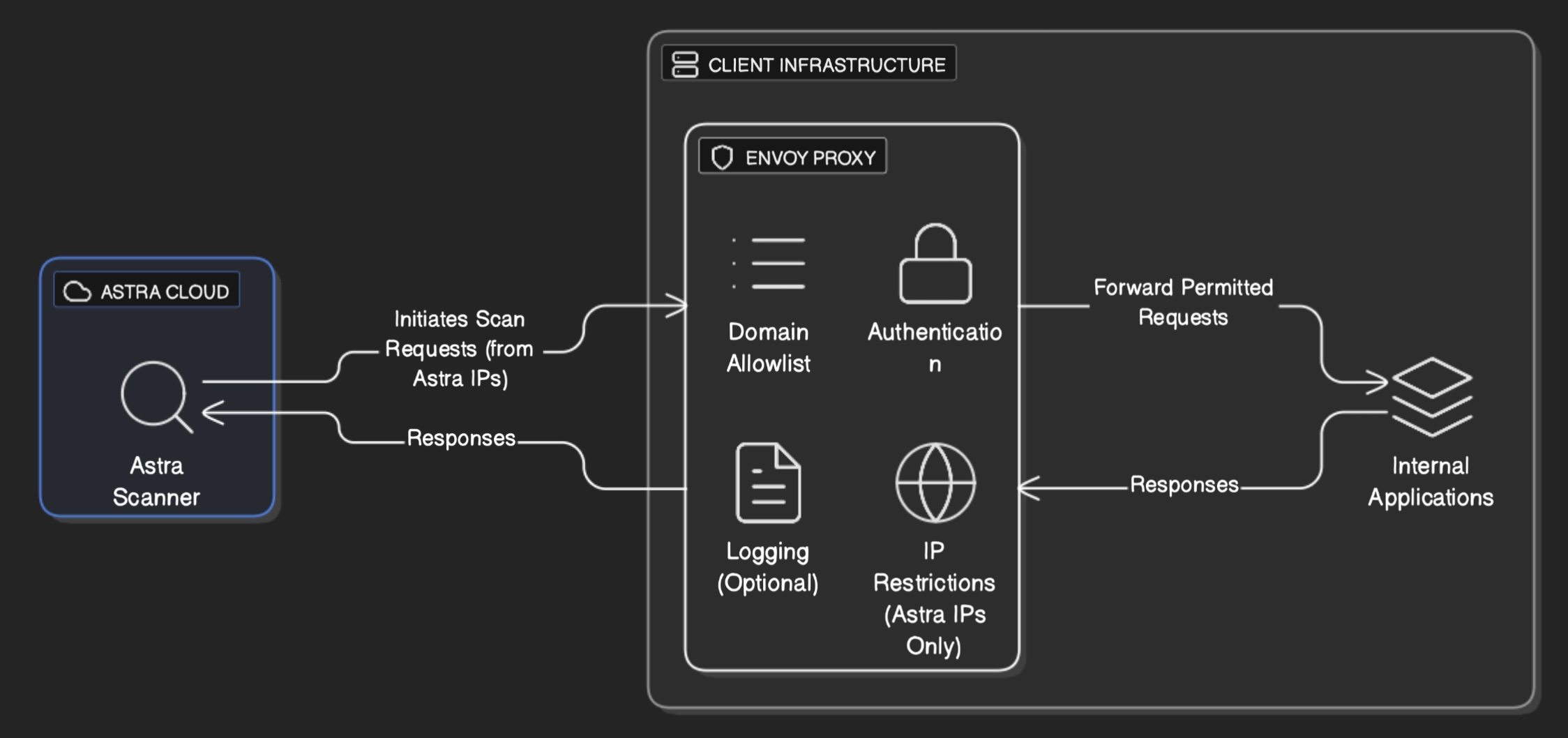
Setup Details
1. Deploy Envoy Proxy VM
Provision a VM within the private network that has network access to all internal applications to be scanned.
Ensure the VM is reachable from Astra’s scanning IP ranges - 📄 Astra IP Ranges
2. Configure Envoy
Set up HTTP dynamic forward proxy functionality to route requests to internal applications.
Apply RBAC rules to restrict incoming requests to Astra IPs only.
Enable access logging to monitor all proxied requests.
Configure the proxy settings so that Astra can send scanning requests via the proxy.
Reference Guides:
3. Firewall and Security
Configure firewall rules to allow traffic from Astra’s scanning IPs only.
Limit outbound access from the proxy to only the internal applications required for scanning.
Optionally, enforce authorization headers for added security.
4. Example Configuration
VM Deployment
Below is an Ansible playbook that installs, configures, and runs Envoy as a forward proxy.
It ensures prerequisites are installed, sets up the Envoy repository, installs the package, deploys a working forward-proxy configuration, and manages the Envoy service with systemd.
Note: This playbook provides a basic installation and configuration of Envoy as a forward proxy. You are encouraged to extend it further by adding RBAC policies, access controls, logging, monitoring, and TLS/mTLS configurations as per your organizational security and compliance requirements.
---
- name: Install and configure Envoy as forward proxy
  hosts: all
  become: yes
  gather_facts: false
  vars:
    envoy_config_file: /etc/envoy/envoy.yaml
    envoy_proxy_port: 8080
    envoy_admin_port: 9901
    envoy_distro: "{{ ansible_distribution_release }}"  # e.g., 'focal' for Ubuntu 20.04, 'jammy' for Ubuntu 22.04, 'noble' for 24.04

  tasks:
    - name: Ensure prerequisites are installed
      apt:
        name:
          - wget
          - gpg
          - ca-certificates
          - apt-transport-https  # For HTTPS repo support
        state: present
        update_cache: yes

    - name: Add Envoy signing key
      shell: |
        wget -O- https://apt.envoyproxy.io/signing.key | sudo gpg --dearmor -o /etc/apt/trusted.gpg.d/envoy-keyring.gpg
      args:
        creates: /etc/apt/trusted.gpg.d/envoy-keyring.gpg

    - name: Add Envoy apt repository
      copy:
        content: "deb [arch=amd64 signed-by=/etc/apt/trusted.gpg.d/envoy-keyring.gpg] https://apt.envoyproxy.io {{ envoy_distro }} main"
        dest: /etc/apt/sources.list.d/envoy.list
      notify: Update apt cache

    - name: Update apt cache
      apt:
        update_cache: yes
      changed_when: false

    - name: Install Envoy
      apt:
        name: envoy
        state: present

    - name: Create Envoy configuration directory
      file:
        path: /etc/envoy
        state: directory
        mode: '0755'

    - name: Deploy Envoy forward proxy configuration
      copy:
        content: |
          admin:
            address:
              socket_address:
                address: 0.0.0.0
                port_value: {{ envoy_admin_port }}

          layered_runtime:
            layers:
              - name: admin
                admin_layer: {}

          static_resources:
            listeners:
              - name: listener_0
                address:
                  socket_address:
                    address: 0.0.0.0
                    port_value: {{ envoy_proxy_port }}
                filter_chains:
                  - filters:
                      - name: envoy.filters.network.http_connection_manager
                        typed_config:
                          "@type": type.googleapis.com/envoy.extensions.filters.network.http_connection_manager.v3.HttpConnectionManager
                          stat_prefix: ingress_http
                          http_filters:
                            - name: envoy.filters.http.dynamic_forward_proxy
                              typed_config:
                                "@type": type.googleapis.com/envoy.extensions.filters.http.dynamic_forward_proxy.v3.FilterConfig
                                dns_cache_config:
                                  name: dynamic_forward_proxy_cache_config
                                  dns_lookup_family: V4_ONLY
                            - name: envoy.filters.http.router
                              typed_config:
                                "@type": type.googleapis.com/envoy.extensions.filters.http.router.v3.Router
                          route_config:
                            name: local_route
                            virtual_hosts:
                              - name: local_service
                                domains: ["*"]
                                routes:
                                  # Existing route for regular HTTP requests (absolute URIs)
                                  - match:
                                      prefix: "/"
                                    route:
                                      cluster: dynamic_forward_proxy_cluster
                                  # New route for HTTPS (CONNECT) requests - this fixes the 404
                                  - match:
                                      connect_matcher: {}
                                    route:
                                      cluster: dynamic_forward_proxy_cluster
                                      upgrade_configs:
                                        - upgrade_type: CONNECT
                                          connect_config: {}
            clusters:
              - name: dynamic_forward_proxy_cluster
                lb_policy: CLUSTER_PROVIDED
                cluster_type:
                  name: envoy.clusters.dynamic_forward_proxy
                  typed_config:
                    "@type": type.googleapis.com/envoy.extensions.clusters.dynamic_forward_proxy.v3.ClusterConfig
                    dns_cache_config:
                      name: dynamic_forward_proxy_cache_config
                      dns_lookup_family: V4_ONLY

        dest: "{{ envoy_config_file }}"
      notify: Restart Envoy

    - name: Create Envoy systemd service
      copy:
        content: |
          [Unit]
          Description=Envoy Proxy
          After=network.target

          [Service]
          ExecStart=/usr/bin/envoy -c {{ envoy_config_file }}
          Restart=always
          User=root
          LimitNOFILE=65536

          [Install]
          WantedBy=multi-user.target
        dest: /etc/systemd/system/envoy.service
      notify: Reload systemd

    - name: Reload systemd daemon
      systemd:
        daemon_reload: yes

    - name: Enable and start Envoy service
      service:
        name: envoy
        enabled: yes
        state: started

  handlers:
    - name: Update apt cache
      apt:
        update_cache: yes

    - name: Restart Envoy
      service:
        name: envoy
        state: restarted

    - name: Reload systemd
      systemd:
        daemon_reload: yes
Kubernetes Deployment
ConfigMap
apiVersion: v1
data:
  envoy_config.yaml: |-
    admin:
      address:
        socket_address:
          address: 0.0.0.0
          port_value: 9901

    layered_runtime:
      layers:
        - name: admin
          admin_layer: {}

    static_resources:
      listeners:
        - name: listener_0
          address:
            socket_address:
              address: 0.0.0.0
              port_value: 8080
          filter_chains:
            - filters:
                - name: envoy.filters.network.http_connection_manager
                  typed_config:
                    "@type": type.googleapis.com/envoy.extensions.filters.network.http_connection_manager.v3.HttpConnectionManager
                    stat_prefix: ingress_http
                    http_filters:
                      - name: envoy.filters.http.dynamic_forward_proxy
                        typed_config:
                          "@type": type.googleapis.com/envoy.extensions.filters.http.dynamic_forward_proxy.v3.FilterConfig
                          dns_cache_config:
                            name: dynamic_forward_proxy_cache_config
                            dns_lookup_family: V4_ONLY
                      - name: envoy.filters.http.router
                        typed_config:
                          "@type": type.googleapis.com/envoy.extensions.filters.http.router.v3.Router
                    route_config:
                      name: local_route
                      virtual_hosts:
                        - name: local_service
                          domains: ["*"]
                          routes:
                            # Existing route for regular HTTP requests (absolute URIs)
                            - match:
                                prefix: "/"
                              route:
                                cluster: dynamic_forward_proxy_cluster
                            # New route for HTTPS (CONNECT) requests - this fixes the 404
                            - match:
                                connect_matcher: {}
                              route:
                                cluster: dynamic_forward_proxy_cluster
                                upgrade_configs:
                                  - upgrade_type: CONNECT
                                    connect_config: {}
      clusters:
        - name: dynamic_forward_proxy_cluster
          lb_policy: CLUSTER_PROVIDED
          cluster_type:
            name: envoy.clusters.dynamic_forward_proxy
            typed_config:
              "@type": type.googleapis.com/envoy.extensions.clusters.dynamic_forward_proxy.v3.ClusterConfig
              dns_cache_config:
                name: dynamic_forward_proxy_cache_config
                dns_lookup_family: V4_ONLY
kind: ConfigMap
metadata:
  name: envoy-config
Deployment
kind: Deployment
apiVersion: apps/v1
metadata:
  name: envoy-gateway
spec:
  replicas: 2
  selector:
    matchLabels:
      app: envoy
  template:
    metadata:
      labels:
        app: envoy
    spec:
      restartPolicy: Always
      securityContext: {}
      containers:
        - resources:
            limits:
              cpu: 150m
              memory: 1Gi
            requests:
              cpu: 100m
              memory: 256Mi
          readinessProbe:
            httpGet:
              path: /ready
              port: admin-http
              scheme: HTTP
            initialDelaySeconds: 5
            timeoutSeconds: 1
            periodSeconds: 10
            successThreshold: 1
            failureThreshold: 3
          terminationMessagePath: /dev/termination-log
          name: envoy-gateway
          livenessProbe:
            httpGet:
              path: /ready
              port: admin-http
              scheme: HTTP
            initialDelaySeconds: 15
            timeoutSeconds: 1
            periodSeconds: 20
            successThreshold: 1
            failureThreshold: 3
          securityContext:
            capabilities:
              drop:
                - ALL
            privileged: false
            runAsGroup: 65532
            runAsUser: 65532
            runAsNonRoot: true
            readOnlyRootFilesystem: true
            allowPrivilegeEscalation: false
            seccompProfile:
              type: RuntimeDefault
          ports:
            - name: http
              containerPort: 8080
              protocol: TCP
            - name: admin-http
              containerPort: 9901
              protocol: TCP
          imagePullPolicy: IfNotPresent
          volumeMounts:
            - name: envoy-gateway-config
              readOnly: true
              mountPath: /config
          image: envoyproxy/envoy:v1.35.3
          args: ["-c", "/config/envoy_config.yaml"]
      volumes:
        - name: envoy-gateway-config
          configMap:
            name: envoy-config
            defaultMode: 420
  strategy:
    type: RollingUpdate
    rollingUpdate:
      maxUnavailable: 25%
      maxSurge: 25%
  revisionHistoryLimit: 10
Service
apiVersion: v1
kind: Service
metadata:
  name: envoy-proxy
  namespace: default
spec:
  type: ClusterIP
  ports:
  - name: http
    port: 8080
    targetPort: http
  - name: admin-http
    port: 9901
    targetPort: admin-http
  selector:
    app: envoy
Limitations
Port Scanning: The proxy typically only allows HTTP(S) traffic on specific ports (e.g., 80/443). Full network or port scans may not work as expected.
Protocol Restrictions: Only protocols supported by the forward proxy (usually HTTP/HTTPS) can be scanned. Non-HTTP services cannot be accessed.
Performance: All scanning traffic is routed through a single proxy, which may introduce latency for large scans.
Access Control Dependencies: Proper RBAC and firewall rules are critical; misconfiguration can block scanning or expose internal apps.
Notes
This setup allows Astra to scan internal applications securely without exposing them publicly.
Multiple internal apps can be accessed through a single proxy instance.
Logging and RBAC provide visibility and security compliance.
Overall Process
The end-to-end process for enabling Astra to scan internal applications via the Envoy forward proxy is as follows:
Review the Setup – Review this guide and discuss any specific requirements with the Astra Engineering team.
Deploy the Forward Proxy – Set up the Envoy forward proxy in the internal network following the configuration guidelines.
Provide Proxy Connection Details – Share the proxy connection information (IP, port, and credentials if applicable) with Astra.
Astra Configuration & Testing – Astra will configure its scanners to use the provided proxy, perform a test connection, and confirm that internal applications are reachable for scanning.
Support
For any questions or clarifications regarding the setup or configuration, you can reach out to your account manager, or the Astra support team. The team can assist with deployment guidance, troubleshooting, and best practices to ensure a secure and smooth scanning setup.